
Does your iPhone charging cable feel loose? Does your phone charge only when you hold the cable at a certain angle? Before buying a new charger or visiting a repair shop, check your iPhone’s charging port. It may be full of dust, pocket lint, or other small bits of dirt.
The good news is that you can often fix this problem with a careful cleaning. Learning how to clean an iPhone charging port doesn’t require expensive tools or special skills. You just need the right supplies and a gentle touch.
However, cleaning the port the wrong way can damage the small parts inside. Metal pins, sharp objects, and liquids can cause serious problems.
In this guide, you’ll learn how to clean your iPhone charging port safely, what tools to use, what to avoid, and how to fix common charging problems.
Why Does Your iPhone Charging Port Get Dirty?
Your iPhone goes almost everywhere with you. You may keep it in your jeans pocket, handbag, backpack, or car. Over time, small bits of dirt can enter the charging port.
Here are some common things that can collect inside:
- Pocket lint: Tiny pieces of fabric can enter the port from your clothes.
- Dust: Small dust particles can build up inside the opening.
- Dirt: Everyday use can push dirt deeper into the port.
- Small debris: Tiny bits of paper or other loose material may get stuck inside.
Pocket lint is one of the most common reasons an iPhone charging cable won’t fit properly. Each time you plug in your cable, it may push the lint deeper into the port.
After some time, the dirt can become tightly packed. This stops the charging cable from making a proper connection.
Signs Your iPhone Charging Port Needs Cleaning
Not sure if your charging port is dirty? Look for these common signs:
- Your charging cable doesn’t go all the way into the port.
- The cable feels loose when connected.
- Your iPhone charges only when the cable is held at a certain angle.
- Charging starts and stops without warning.
- Your phone doesn’t recognize the charging cable.
- You can see dust or lint inside the charging port.
If you notice one or more of these problems, inspect the port before trying to clean it.
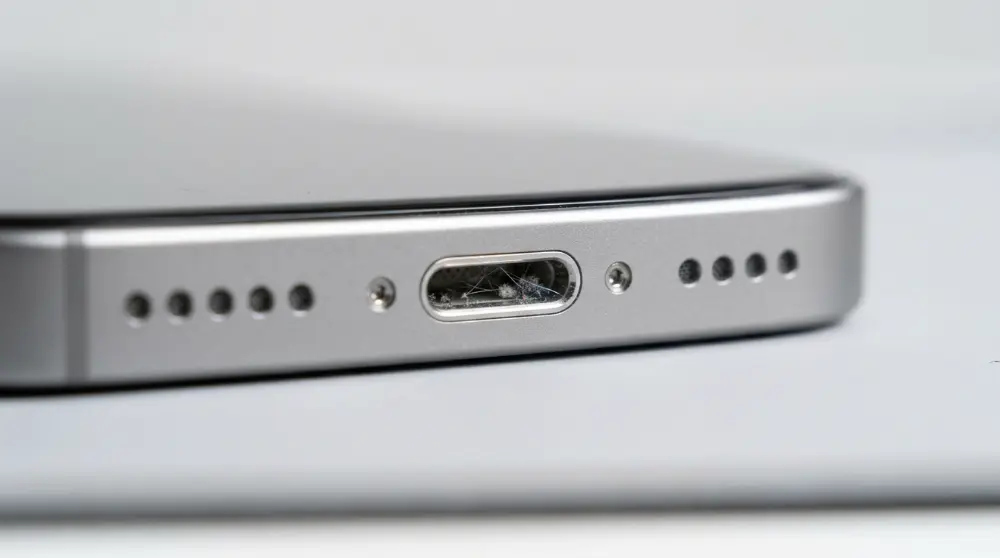
Important: Charging problems don’t always mean your port is dirty. A damaged cable, faulty power adapter, software issue, or damaged charging port can cause similar problems.
What Do You Need to Clean an iPhone Charging Port?
Before you start, collect a few simple supplies. You don’t need an expensive cleaning kit.
Here are some useful items:

- Flashlight: Helps you see dust and lint inside the port.
- Wooden or plastic cleaning pick: Can help remove loose, packed debris when used with extreme care.
- Soft-bristled, dry brush: Helps remove loose dust around the port opening.
- Clean, dry cloth: Useful for wiping the outside of your phone.
A flashlight is especially helpful because charging ports are small and difficult to see clearly.
Avoid using metal tools, needles, paper clips, or sharp objects. They can damage the electrical contacts inside your iPhone.
Also, don’t pour water, alcohol, or any other cleaning liquid into the charging port.
Now that you have your cleaning supplies ready, it’s time to clean your iPhone charging port. Take your time and avoid using force. The small parts inside the port can be damaged easily.
Follow these steps carefully.
Step 1: Turn Off Your iPhone
Before cleaning, switch off your iPhone completely.
Here’s how:
- Press and hold the side button and either volume button.
- Wait until the power-off slider appears.
- Drag the slider to turn off your iPhone.
- Disconnect the charging cable and any other accessories.
Turning off your phone helps prevent accidental electrical problems while you work.
Never try to clean the charging port while your iPhone is connected to a charger.
Step 2: Inspect the Charging Port With a Flashlight
Use a flashlight to look inside the charging port.

Hold your iPhone so you can clearly see the bottom and sides of the opening.
Look for:
- Gray or black pocket lint.
- Small dust particles.
- Packed dirt around the edges.
- Loose pieces of debris.
Sometimes, the dirt is difficult to notice because it sits deep inside the port.
If you see packed lint, don’t try to remove it with your fingernail or a metal pin. Use a safe cleaning method instead.
Step 3: Remove Loose Dust and Lint Carefully
This is the most important step.
If you can see loose debris near the opening, use a clean, soft-bristled, dry brush to gently remove it.

Keep your movements light. Don’t push the brush deep inside the charging port.
If debris remains stuck, don’t force a toothpick or other tool into the opening. The charging contacts and internal parts are delicate.
For stubborn dirt, it’s safer to have an Apple Authorized Service Provider or qualified repair professional clean the port.
Step 4: Clean the Outside of the Charging Port
After removing loose dirt, check the area around the charging port.
Use a clean, dry, lint-free cloth to wipe the outside of your iPhone.
This removes dust and dirt that may collect around the opening.
Don’t use wet wipes or spray cleaning products directly into the charging port.
Step 5: Inspect the Port Again
Shine your flashlight inside the charging port one more time.
Check whether you can still see dust, lint, or other debris.
Make sure nothing is blocking the opening.
If you notice bent contacts, corrosion, or signs of damage, stop cleaning. Don’t try to repair these parts yourself.
Step 6: Test Your iPhone Charging Connection
Once you’re sure the port is dry and free of loose debris, turn your iPhone back on.
Connect a compatible charging cable and check the connection.
Look for these signs:
- The cable fits properly.
- Your iPhone recognizes the charger.
- Charging starts normally.
- The connection doesn’t stop when you gently move the cable.
If everything works, your charging problem may have been caused by dirt or debris.
If your iPhone still doesn’t charge, don’t keep poking inside the port. There may be another problem that needs attention.
Does the Cleaning Process Differ Between Lightning and USB-C Ports?
Yes. Different iPhone models use different charging ports.
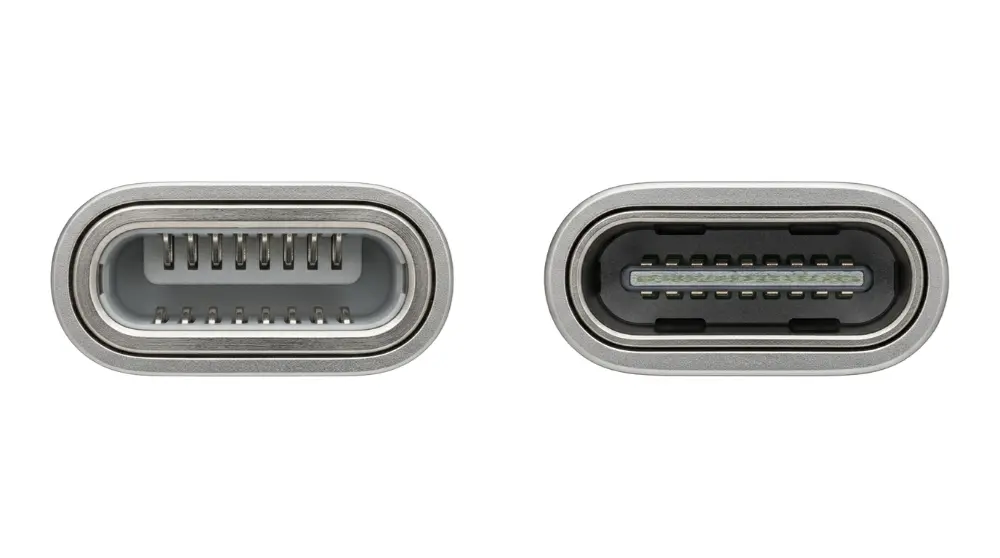
- Lightning port: Found on iPhone 14 and older models.
- USB-C port: Found on iPhone 15 and newer models.
Both ports need careful handling. However, USB-C ports have a small central connector tongue that can be damaged if you push a tool against it.
Never force a cleaning tool into either type of port.
You don’t always need a toothpick or special cleaning kit to deal with a dirty iPhone charging port. However, you should be careful about which tools you use. Some popular cleaning tricks can cause more harm than good.
Let’s look at safer options and common mistakes to avoid.
How to Clean an iPhone Charging Port Without a Toothpick
If you don’t have a toothpick, you can still remove loose dust from around the charging port.
Here are a few options:
1. Use a Soft-Bristled Brush
A clean, dry, soft-bristled brush is useful for removing loose dust.
Follow these steps:
- Turn off your iPhone.
- Hold the phone with the charging port facing downward.
- Gently brush around the opening.
- Let loose dust fall away from the port.
Don’t push the brush deep inside. Avoid stiff brushes that could damage the small parts.
2. Use a Clean, Dry Microfiber Cloth
A microfiber cloth is helpful for cleaning the outside of your charging port.
Gently wipe around the opening to remove surface dust and dirt.
Remember that a cloth won’t remove lint packed deep inside the port.
3. Use Professional Cleaning Help
If dirt is stuck deep inside and won’t come out easily, don’t try different household tools.
A qualified phone repair professional can inspect the port and remove stubborn debris without putting unnecessary pressure on its internal parts.
Can You Use Compressed Air to Clean an iPhone Charging Port?
Compressed air may seem like an easy way to remove dust. However, it’s not the best choice for cleaning an iPhone charging port.
Strong air pressure can push dirt deeper inside the phone or affect nearby parts.
Apple advises users not to use compressed air when cleaning their devices.
It’s better to use gentle external brushing for loose dust. If debris is packed inside, seek professional help.
What Should You Never Use to Clean an iPhone Charging Port?
Some cleaning methods found online can damage your phone.
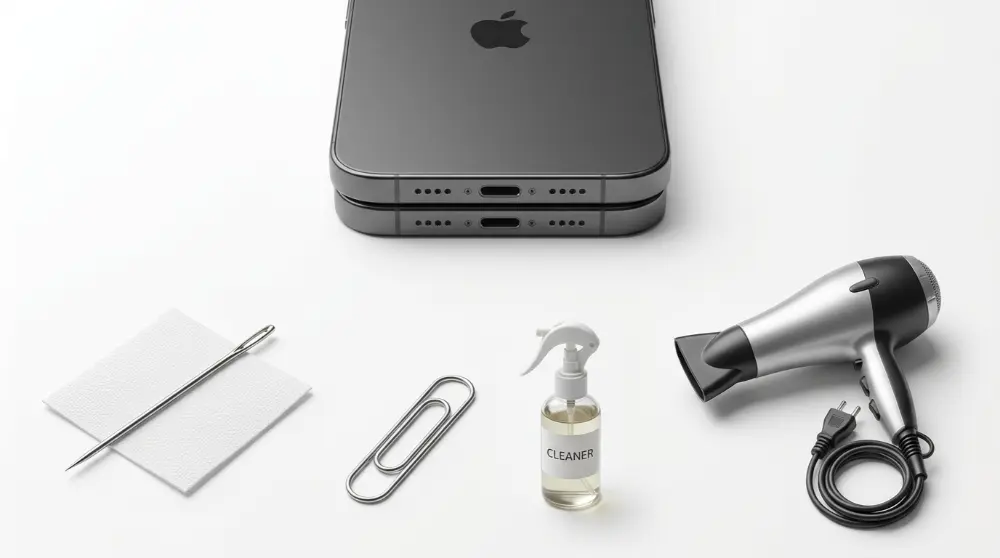
Avoid these common mistakes:
- Metal needles: They can damage electrical contacts and cause short circuits.
- Paper clips: Their metal tips can scratch or damage internal parts.
- SIM ejector tools: These are designed for SIM trays, not charging ports.
- Water: Liquid inside the port can cause damage.
- Rubbing alcohol: Don’t pour or spray it into the charging port.
- Hot glue: Glue can stick to internal parts and make removal difficult.
- Strong adhesives: Tape and sticky materials can leave residue inside the port.
- Hair dryers: Heat can damage your iPhone’s internal components.
A cleaning trick that works for one person doesn’t mean it’s safe for every iPhone.
When in doubt, don’t insert anything into the charging port.
What If Your iPhone Still Doesn’t Charge After Cleaning?
If your iPhone still won’t charge, dirt may not be the problem.
Try these simple checks:
- Check your charging cable: Look for cuts, bends, or damaged connectors.
- Try another charger: Use a compatible cable and power adapter that you know work.
- Check the power source: Try another wall outlet.
- Restart your iPhone: A simple restart may fix a temporary software issue.
- Check for moisture: If you see a liquid-detection alert, disconnect the cable and let the connector dry naturally.
If none of these steps works, your charging port may be damaged or need professional cleaning.
If you’re considering replacing your phone instead, check out our guide to the best phone camera in 2026 to compare popular camera phones and their features.
Don’t force the cable into the port or continue trying to clean it yourself.
How to Keep Your iPhone Charging Port Clean
Cleaning your iPhone charging port is important, but keeping it clean can help prevent future charging problems. Dust and pocket lint can collect inside the port over time, especially if you carry your phone in your pocket or bag.
Here are some simple ways to protect your charging port and keep it in good condition.
Simple Tips to Keep Your Charging Port Clean
- Keep your iPhone away from dust: Avoid placing your phone on dirty tables, floors, or other dusty surfaces. Small dust particles can enter the charging port.
- Clean your pockets regularly: Empty your pockets and remove loose lint before putting your iPhone inside. This can reduce the amount of dirt that enters the port.
- Use a protective phone case: Choose a good-quality case that protects your phone from everyday dirt and damage. Make sure it doesn’t block the charging port.
- Avoid dusty places: Try not to leave your iPhone in areas with lots of dust, sand, or small particles.
- Check your charging port occasionally: Use a flashlight to look inside the port. If you notice visible dirt, deal with it carefully instead of waiting for it to build up.
- Handle charging cables properly: Always connect and disconnect your charging cable gently. Never push the connector into the port if it doesn’t fit easily.
You don’t need to clean your iPhone charging port every day. Check it occasionally and only clean it when you notice dirt or charging problems.
Frequently Asked Questions
1. How often should I clean my iPhone charging port?
There is no fixed cleaning schedule. Check your charging port occasionally and clean it only when you notice dust, lint, or debris. Cleaning it too often can increase the risk of damaging its internal parts.
2. Can I clean my iPhone charging port with a toothpick?
It’s better to avoid inserting a toothpick into the charging port. Even wooden toothpicks can break or damage delicate parts. Use a soft, dry brush around the opening or ask a professional to remove packed debris.
3. How do I clean water from my iPhone charging port?
Disconnect the charging cable immediately. Hold your iPhone with the port facing downward and gently tap it against your hand to remove excess liquid. Leave it in a dry area with good airflow. Don’t use rice, a hair dryer, or compressed air. It may take up to 24 hours for the port to dry completely.
4. Can a dirty charging port stop my iPhone from charging?
Yes. Dust and packed pocket lint can block the connection between your charging cable and the port. This may cause slow charging, an unstable connection, or charging failure.
5. Can I use rubbing alcohol to clean my iPhone charging port?
No. Don’t pour or spray rubbing alcohol into the charging port. Liquids can damage internal components. Use a safe, dry cleaning method instead.
6. What should I do if my iPhone still won’t charge?
Try another compatible charging cable and power adapter. Check the power outlet and restart your iPhone. If the problem continues, contact Apple Support or visit an Apple Authorized Service Provider.
Final Thoughts
Learning how to clean an iPhone charging port can help you avoid common charging problems. Always turn off your phone before cleaning and handle the port carefully. Avoid metal tools, sharp objects, and liquids.
If dirt is stuck deep inside or your iPhone still won’t charge, don’t force anything into the port. Let a qualified repair professional inspect it. A little care can help protect your charging port and keep your iPhone working properly.