
Studying isn’t always easy. You have notes to write, exams to prepare for, homework to finish, and deadlines to remember. Sometimes, you sit down to study but end up spending more time on your phone than on your books.
That’s where study apps can help.
The best study apps make learning simpler. They help you organize class notes, remember important facts, understand difficult topics, and stay focused. Some apps even use AI to turn your study materials into notes, flashcards, and practice questions.
But here’s the thing: you don’t need every study app available. You just need the right ones for your daily needs.
In this guide, we’ll look at 10 useful study apps in 2026. Whether you’re in high school, college, or university, you’ll find options that can make your study routine easier.
10 Best Study Apps for Students in 2026
Not every student learns in the same way. Some need help remembering facts, while others struggle with time management or taking clear notes.
Here are 10 study apps that can help with different parts of student life.
1. Goodnotes – Best Study App for Taking Notes
<text-placeholder></text-placeholder>
Goodnotes is a digital note-taking app that helps students keep their class notes in one place. Instead of carrying several notebooks, you can create digital notebooks for different subjects.
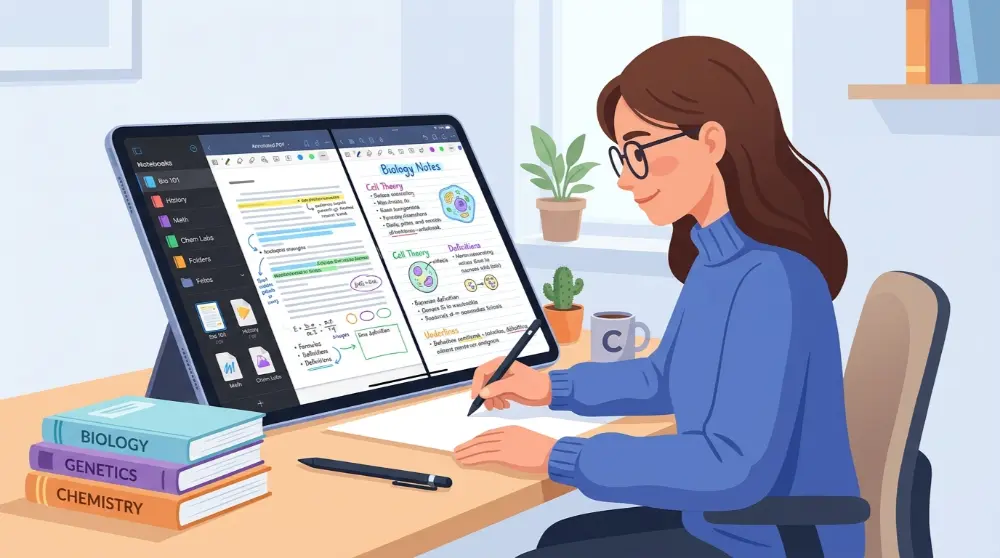
It’s especially useful if you like writing notes by hand on a tablet or organizing your study materials in a clean way.
Key Features:
- Create separate notebooks for different subjects.
- Write notes by hand or type them.
- Upload and highlight PDF files.
- Use digital planners to manage assignments.
- Organize important study materials.
One helpful feature is PDF annotation. For example, if your teacher shares a PDF chapter, you can open it in Goodnotes, highlight important points, and add your own notes.
Best For: Students who take handwritten notes, read PDF books, and want to keep their study materials organized.
Availability: iOS, Android, Windows, and web.
Cost: Free with optional paid features.
2. Microsoft OneNote – Best Free App for Organizing Study Notes
Microsoft OneNote is another useful choice for students who want to organize their notes without carrying paper notebooks.

It works like a digital notebook. You can create different sections for your subjects and add pages for individual lessons.
For example, you can create a notebook called Biology and add separate pages for each chapter. This makes it easier to find your notes when exam time comes.
Key Features:
- Create notebooks for different subjects.
- Type or write notes by hand.
- Add images, links, and other useful information.
- Organize lessons into sections and pages.
- Sync notes across supported devices.
OneNote is a good option if you already use Microsoft tools for school or university work.
Best For: Students who want a simple way to collect, organize, and review class notes.
3. Quizlet – Best Study App for Flashcards
Remembering important facts before an exam can be hard. Quizlet makes this task easier with digital flashcards and simple learning activities.

You can create your own flashcards or use study sets made by other students. Each card can contain a question on one side and its answer on the other.
For example, if you’re studying science, you can create cards with questions about the human body, plants, or chemical elements. Then, you can test yourself whenever you have a few free minutes.
Key Features:
- Create digital flashcards for any subject.
- Explore ready-made study sets.
- Practice with different learning activities.
- Review important terms and definitions.
- Study on your phone or computer.
Quizlet is especially helpful when you need to learn new words, dates, formulas, and other facts.
Best For: Students who want to memorize information and prepare for tests and exams.
Availability: Android, iOS, and web.
Cost: Free with optional paid features.
4. Anki – Best App for Long-Term Memory
Anki is a flashcard app that helps you remember information for a longer time. It uses a method called spaced repetition.

In simple words, the app shows you a flashcard again when you’re more likely to forget its answer. Cards you find difficult can appear more often, while easier cards appear less often.
This makes Anki useful for students who have to remember a lot of information.
For example, medical students can use it to review medical terms, body parts, and important facts. Language learners can also use it to practice new words.
Key Features:
- Create your own flashcards.
- Review cards using spaced repetition.
- Add images and audio to cards.
- Customize your learning experience.
- Use shared decks created by other people.
Anki may take some time to learn because it offers many settings. However, once you understand how it works, it can become a helpful part of your daily study routine.
Best For: Medical students, language learners, and anyone who needs to remember information for a long time.
Availability: Windows, macOS, Linux, Android, iOS, and web.
Cost: Free on most platforms, with a paid official iOS app.
5. Notion – Best App for Student Organization
If your assignments, notes, class schedules, and project details are spread across different places, Notion can help you bring everything together.

Notion is an all-in-one workspace where you can create pages, notes, to-do lists, and study plans. You can also build a simple study dashboard to see what needs your attention.
For example, you can make a weekly study planner with separate sections for homework, upcoming exams, and daily goals.
Key Features:
- Create notes and study pages.
- Build assignment and task lists.
- Make weekly and monthly study planners.
- Organize projects in one workspace.
- Use templates to save time.
Notion also offers AI features that can help with tasks such as summarizing information and improving written content. Some AI features may require a paid plan.
Best For: Students who want one place to organize notes, assignments, projects, and study schedules.
Availability: Android, iOS, Windows, macOS, and web.
Cost: Free plan available with paid plans and optional AI features.
These apps cover three important parts of studying: remembering information, keeping useful notes, and staying organized. But what if your biggest problem isn’t learning or planning? What if you simply can’t stay focused?
6. Forest – Best Study App for Staying Focused
Do you often check your phone while studying? You start reading a chapter, receive a notification, and suddenly spend 20 minutes scrolling through social media.

Forest can help you break this habit.
The app uses a simple idea. When you start a focus session, you plant a virtual tree. As long as you stay focused and avoid leaving the app, your tree continues to grow. If you leave the session, your tree may stop growing.
Over time, you can build a virtual forest by completing your study sessions.
Key Features:
- Start timed focus sessions.
- Grow virtual trees while studying.
- Track your focus time.
- Build a forest as you complete sessions.
- Set goals for better study habits.
Forest makes studying feel more like a small game. This can encourage you to put your phone aside and finish your work.
Best For: Students who get distracted by social media, games, and phone notifications.
Availability: Android, iOS, and supported browser extensions.
Cost: Pricing varies by platform.
7. Todoist – Best App for Managing Assignments
Keeping track of homework, projects, and exam dates isn’t always easy. You may remember one assignment but forget another. Todoist helps you manage these tasks with simple to-do lists.

You can create separate projects for different subjects and add tasks with due dates. This makes it easier to see what needs to be done first.
For example, if you have a math test on Friday, you can add smaller tasks for each day. You might review formulas on Monday, solve practice questions on Tuesday, and revise difficult topics on Wednesday.
Key Features:
- Create daily and weekly task lists.
- Set due dates and reminders.
- Organize tasks into different projects.
- Add priorities to important assignments.
- Track completed tasks.
Todoist is easy to use, even if you’ve never used a planning app before.
Best For: Students who have many assignments, projects, and deadlines to manage.
Availability: Android, iOS, Windows, macOS, and web.
Cost: Free plan available with optional paid plans.
8. Google Calendar – Best App for Planning Your Study Schedule
A good study plan can make your day easier. Google Calendar helps you decide when to study, complete homework, attend classes, and take breaks.

You can create events for different activities and set reminders so you don’t forget important tasks.
For example, you can add a study session from 4 PM to 5 PM, schedule a break, and then plan another session for a different subject.
You can also view your entire week to see whether you have enough time for your upcoming exams.
Key Features:
- Create study schedules and events.
- Set reminders for important deadlines.
- Plan daily and weekly activities.
- Share calendars with classmates.
- Sync events across supported devices.
The best part is that you can use it to manage both your studies and personal activities in one place.
Best For: Students who struggle with time management or often forget classes, assignments, and exam dates.
Availability: Android, iOS, and web.
Cost: Free for personal use.
Forest helps you protect your study time, while Todoist and Google Calendar help you decide how to use it. The next two apps focus on a different need: learning difficult topics and getting more help from your study materials.
9. StudyFetch – Best AI Study App for Students
Studying from long PDFs, lecture slides, and class notes can take a lot of time. StudyFetch helps make this process easier by using AI to turn your learning materials into useful study resources.

You can upload your study materials and use the platform to create notes, flashcards, and practice questions. It also offers an AI tutor that can help explain topics you find difficult.
For example, if you upload a biology lecture, StudyFetch can help you review its main points and create questions to test what you’ve learned.
Key Features:
- Turn uploaded study materials into notes.
- Create flashcards from learning content.
- Generate practice questions.
- Use an AI tutor to understand difficult topics.
- Organize study materials for review.
One useful thing about StudyFetch is that it works with your own course materials. This can make your study sessions more relevant to what you’re learning in class.
However, always check AI-generated answers against your textbooks or teacher’s notes. AI tools can sometimes make mistakes.
Best For: Students who want to save time preparing notes, flashcards, and practice questions.
Availability: Web and supported mobile platforms.
Cost: Free access may be available with optional paid plans.
10. ChatGPT – Best AI App for Understanding Difficult Topics
Sometimes, reading a textbook several times still doesn’t make a topic clear. That’s where ChatGPT can help.

You can ask questions in simple language and get explanations based on your learning needs. If you’re struggling with a math problem, for example, you can ask ChatGPT to explain the steps one by one.
You can also use it to prepare for exams, understand new words, and practice questions.
Key Features:
- Explain difficult topics in simple words.
- Create practice questions and quizzes.
- Summarize study materials.
- Help you understand math problems step by step.
- Create study plans for different subjects.
Another useful way to use ChatGPT is to ask it to act like a teacher. You can give it a topic and ask questions one at a time to test your knowledge.
For example, you could write:
“Explain photosynthesis in simple English. Then give me five questions to test what I’ve learned.”
This makes learning more interactive and helps you find topics that need more practice.
Remember, ChatGPT isn’t a replacement for your teachers or textbooks. Check important facts and calculations before using them in assignments.
Best For: Students who need help understanding difficult lessons, practicing questions, and reviewing topics.
Availability: Android, iOS, and web.
Cost: Free plan available with optional paid plans.
How to Choose the Best Study Apps for Your Needs
With so many study apps available, choosing the right one can feel confusing. The easiest way is to think about what you struggle with most.
You don’t need to install all 10 apps. Start with one or two that solve your biggest problems.
Here are some simple suggestions:
| Your Study Need | Recommended App |
|---|---|
| Taking digital notes | Goodnotes |
| Organizing class notes | Microsoft OneNote |
| Memorizing facts | Quizlet |
| Long-term memory | Anki |
| Managing study materials | Notion |
| Staying focused | Forest |
| Tracking assignments | Todoist |
| Planning your schedule | Google Calendar |
| Creating AI study materials | StudyFetch |
| Understanding difficult topics | ChatGPT |
For example, if you often forget important facts, start with Quizlet or Anki. If you struggle to manage your daily schedule, try Google Calendar and Todoist.
The goal isn’t to use more apps. It’s to build a simple system that helps you study better.
Tips to Get the Most Out of Study Apps
Downloading study apps is easy, but using them regularly is what makes a difference. Here are some simple tips to help you get better results.
1. Start With Only a Few Apps
Don’t install every study app at once. Too many apps can make your routine confusing.
Start with two or three apps that solve your biggest problems. For example, use OneNote for class notes, Anki for memorization, and Forest for focus.
2. Set Small Daily Study Goals
Big study goals can feel difficult. Instead, break your work into smaller tasks.
For example, instead of writing “Study biology,” set a goal to read one chapter and answer five questions. Small tasks are easier to complete and help you stay motivated.
3. Review Your Notes Regularly
Don’t wait until exam week to review everything. Spend a little time each day going through your notes and flashcards.
Apps like Quizlet and Anki can help you review important information and remember it for longer.
4. Avoid Distractions During Study Time
Keep your phone away when you don’t need it. Turn off unnecessary notifications and use a focus timer if you struggle to concentrate.
You can also try the Pomodoro Technique. Study for 25 minutes, take a short break, and repeat the process.
5. Check Your Progress Every Week
At the end of each week, look at what you’ve completed. Check your assignments, review difficult topics, and plan your next study sessions.
This simple habit can help you understand where you’re improving and what needs more attention.
Frequently Asked Questions About Study Apps
What is the best study app for students?
The best study app depends on your needs. Goodnotes and OneNote are useful for taking notes, Quizlet and Anki help with memorization, and Forest can help you stay focused. ChatGPT and StudyFetch offer AI-powered learning support.
What are the best free study apps?
Several useful study apps offer free plans or free versions. These include Microsoft OneNote, Google Calendar, Anki on most platforms, Todoist, Quizlet, and ChatGPT. Some apps also offer paid features, so check their current plans before choosing.
Which app is best for studying for exams?
Quizlet and Anki are good choices for exam preparation because they help you review important facts and practice remembering information. You can also use ChatGPT to create practice questions and explain difficult topics.
Can I use ChatGPT to study?
Yes. You can use ChatGPT to understand difficult topics, summarize information, create quizzes, and make study plans. However, always check important answers against reliable learning materials.
Which study app is best for staying focused?
Forest is a useful choice if you get distracted by your phone. It uses virtual trees to encourage you to stay focused during timed study sessions.
Are study apps better than traditional notebooks?
Not always. Digital study apps make it easier to organize, search, and access notes across devices. However, traditional notebooks can also work well if you prefer writing on paper. Choose the method that helps you learn best.
Final Thoughts
The best study apps can make student life easier, but you don’t need to use all of them. The right choice depends on what you want to improve.
If you need better notes, try Goodnotes or OneNote. For memorization, Quizlet and Anki are worth exploring. If staying focused is your biggest challenge, Forest can help. And if you want help understanding difficult lessons, ChatGPT and StudyFetch are useful options.
Start with one or two apps, build a simple study routine, and see what works for you. Remember, apps are only tools. Your daily effort, practice, and consistency are what really help you succeed.