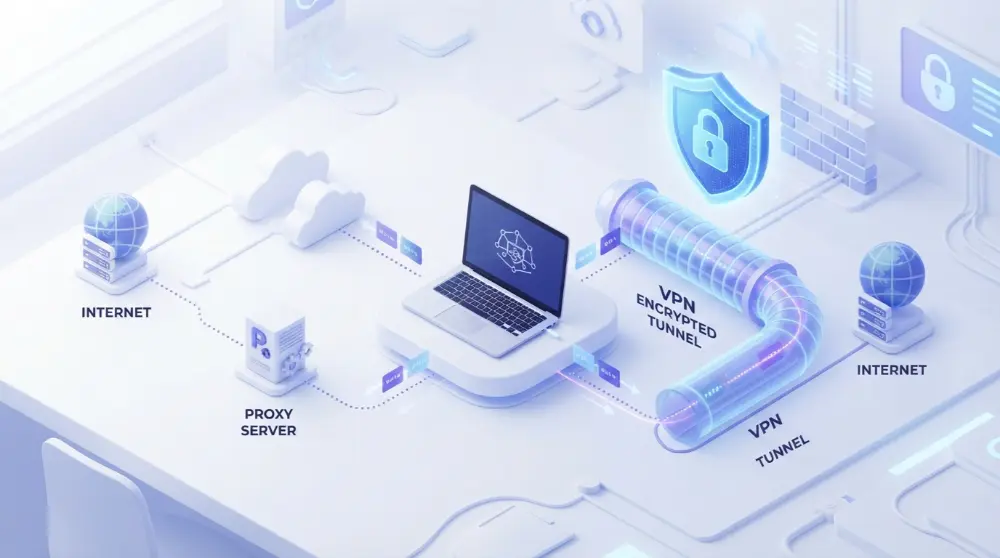
Have you ever wanted to hide your IP address, access a blocked website, or browse the internet more privately? You may have come across two options: a VPN and a proxy. Both can change the IP address that websites see, but they don’t protect your internet connection in the same way.
So, what is a VPN vs proxy, and which one should you use?
A proxy works like a middleman between your browser and the website you visit. It sends your requests through another server, making it look like you’re browsing from a different location. A VPN does something similar, but it also encrypts your internet traffic and can protect connections from all apps on your device.
For example, imagine you’re using public Wi-Fi at a coffee shop. A proxy might hide your real IP address from the website you’re visiting, but it usually won’t protect your data from people monitoring the network. A VPN creates an encrypted connection that makes it much harder for others to read your internet traffic.
In this guide, you’ll learn how VPNs and proxies work, their main differences, their advantages and disadvantages, and when to use each one.
Let’s break it down in simple terms.
What Is a Proxy Server?
A proxy server is an online server that sits between your device and the websites you visit. Instead of connecting directly to a website, your browser sends its request to the proxy server first.
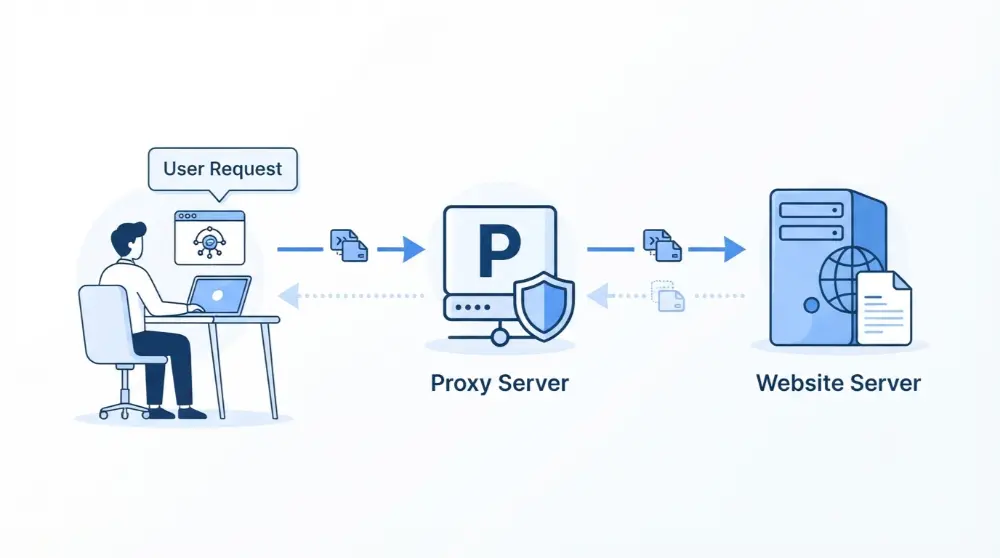
The proxy then sends that request to the website on your behalf. When the website responds, the proxy sends the information back to your browser.
Here’s a simple example:
Imagine you live in Pakistan but want to visit a website that sees your location as the United States. You connect to a US-based proxy server. The website sees the proxy’s IP address instead of your original IP address.
How Does a Proxy Server Work?
A proxy server works by forwarding your internet requests through another server. It acts as a bridge between your device and the website you want to visit.
Here’s how the process works:
- You visit a website: You enter a website address in your browser.
- Your request goes to the proxy: Instead of connecting directly, your browser sends the request to the proxy server.
- The proxy connects to the website: The website receives the request from the proxy’s IP address.
- The website sends a response: The website sends the requested information back to the proxy.
- You receive the information: The proxy forwards the website’s response to your browser.
In most cases, the website sees the proxy’s IP address rather than your real IP address.
However, there’s something important to understand. A proxy doesn’t automatically encrypt your internet connection. Your internet provider or someone monitoring an unprotected network may still be able to see parts of your online activity.
What Are the Different Types of Proxy Servers?
Not all proxy servers work in the same way. Some focus on hiding your IP address, while others help businesses manage internet traffic.
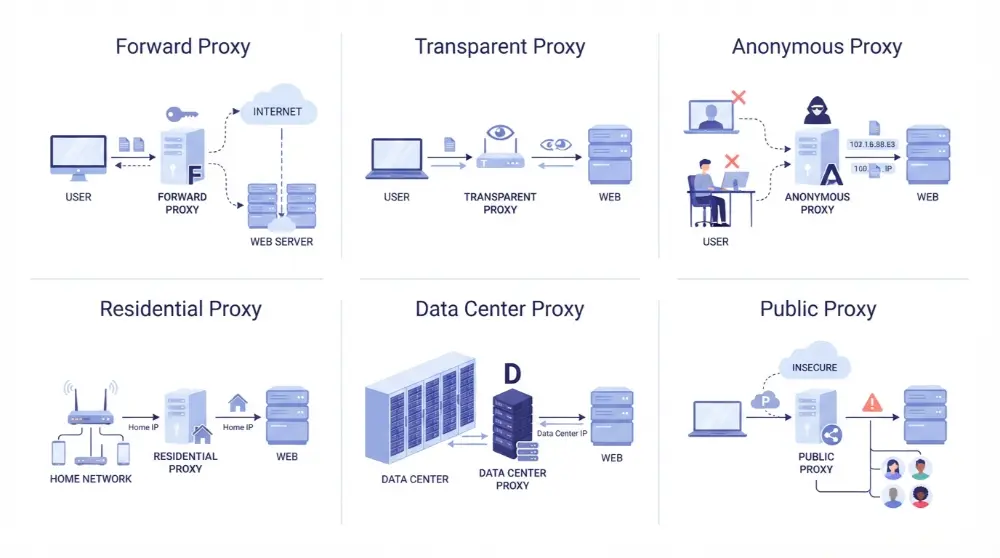
Here are some common types:
- Forward proxy: It sits between users and the internet. Businesses often use it to control which websites employees can access.
- Transparent proxy: It forwards internet requests without requiring users to set it up manually. Schools and workplaces may use it to filter websites.
- Anonymous proxy: It hides your original IP address from the websites you visit, but it may still identify itself as a proxy.
- High anonymity proxy: It tries to hide both your original IP address and information that could reveal you’re using a proxy.
- Residential proxy: It routes your traffic through an IP address linked to a residential internet connection.
- Data center proxy: It uses an IP address provided by a data center rather than a home internet connection.
- Public proxy: It’s available to many users, often for free. However, it may be slow or unsafe.
- Shared proxy: Multiple people use the same proxy server and IP address.
Each type has a different purpose. For everyday browsing, a proxy may help you access certain websites or change your visible IP address. However, you should be careful when using unknown or free proxy services.
A proxy can hide your IP address, but that doesn’t mean your personal information is always safe.
What Is a VPN (Virtual Private Network)?
A VPN, or Virtual Private Network, is a service that creates a secure, encrypted connection between your device and a VPN server. It helps protect your internet traffic and hides your real IP address from the websites you visit.
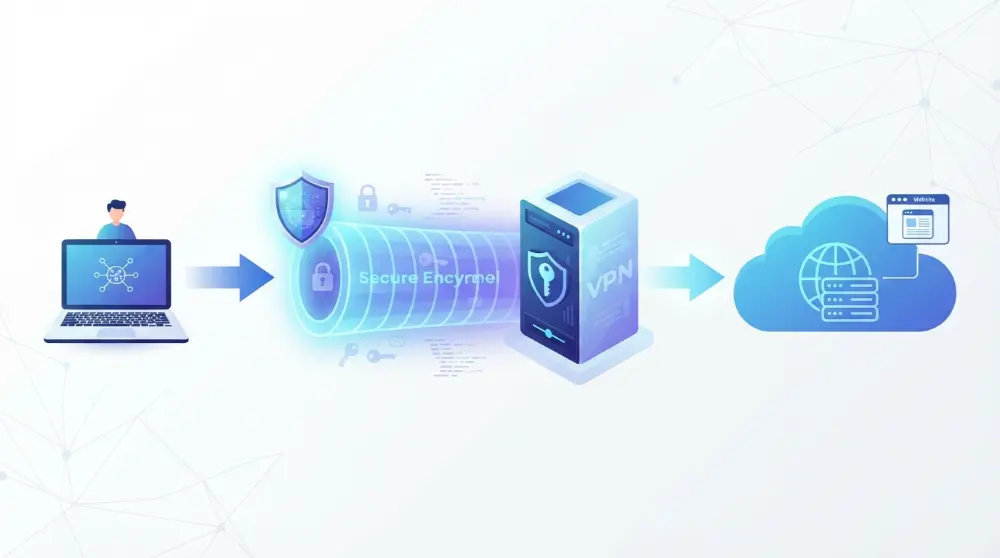
Unlike most proxy servers, a VPN can protect traffic from multiple apps on your device, not just one browser.
For example, imagine you’re using your phone on public Wi-Fi at an airport. You want to check your email, open social media, and browse websites without exposing your internet traffic to others on the same network.
A VPN creates an encrypted connection that helps protect your data while you use these apps.
How Does a VPN Work?
A VPN works by sending your internet traffic through an encrypted tunnel. This tunnel protects the data traveling between your device and the VPN server.
Here’s how the process works:
- You open a VPN app: First, you install and open a VPN service on your computer or smartphone.
- You connect to a VPN server: You choose a server location and connect to it.
- The VPN encrypts your data: Your internet traffic is encrypted before it travels through the VPN connection.
- Your traffic reaches the VPN server: The server receives your encrypted traffic and forwards your internet requests to their destinations.
- You access the website: The website sees the VPN server’s IP address instead of your original IP address.
The VPN also sends the website’s response back through the encrypted connection to your device.
This makes it harder for people on your local network or your internet provider to see the contents of your traffic.
However, remember that a VPN doesn’t make you completely anonymous. Your VPN provider may still be able to see some connection information, depending on its service and privacy practices.
What Are the Different Types of VPNs?
VPNs come in different types. Some are designed for personal use, while others help businesses connect employees and office networks securely.
Here are two common types:
1. Individual VPN
An individual VPN is designed for everyday users. You can install a VPN app on your phone, tablet, or computer and connect to a remote server.
People commonly use personal VPNs to:
- Protect their internet traffic on public Wi-Fi.
- Hide their real IP address from websites.
- Improve online privacy.
- Access websites and services available in other regions.
2. Corporate VPN
A corporate VPN is designed for businesses and organizations. It allows employees to connect securely to company networks when working from home, traveling, or using another internet connection.
For example, an employee working remotely may need access to company files or internal applications. A corporate VPN helps create a secure connection to those resources.
Both types of VPNs use encrypted connections, but they serve different needs.
VPN vs Proxy: What’s the Difference?
Now that you understand how VPNs and proxy servers work, let’s look at their main differences.
Both tools can hide your real IP address and route your internet traffic through another server. However, they offer different levels of security, privacy, and protection.
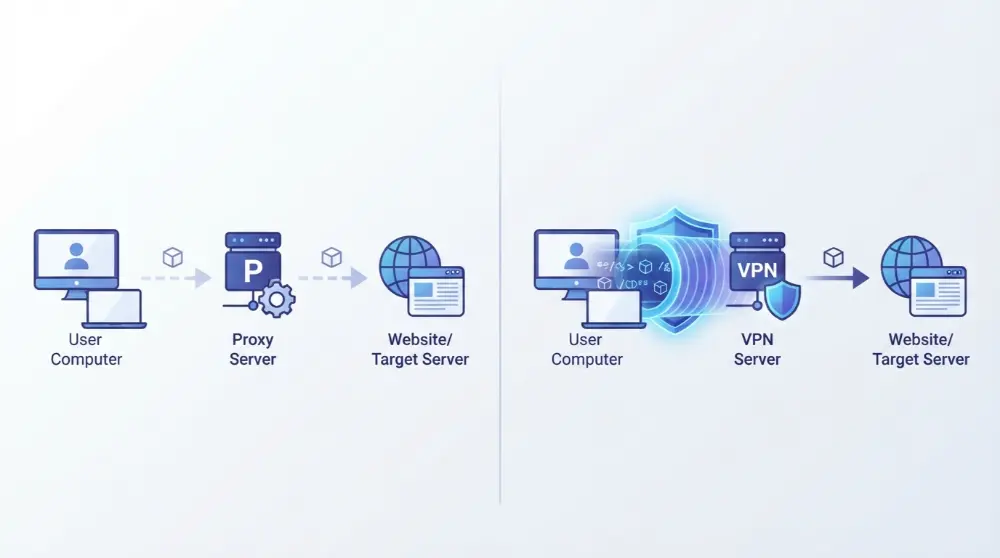
The biggest difference is that a proxy usually handles traffic from a specific app, while a VPN can protect internet traffic from your entire device.
Here are the key differences you should know.
1. Data Encryption
Encryption is one of the biggest differences between a VPN and a proxy.
A VPN encrypts your internet traffic before sending it to the VPN server. This makes it harder for your internet provider, hackers on an unsecured network, or other third parties to read your data.
Most standard proxy servers don’t encrypt your internet traffic. They simply forward your requests through another server.
For example, if you use a public proxy to visit a website without HTTPS, your data may be exposed while traveling across the network.
Winner: VPN because it provides encryption for your connection.
2. Internet Coverage
Another important difference is how much of your device’s internet traffic each tool covers.
A proxy usually works with one application or browser. You may need to configure it separately for different programs.
A VPN can cover your entire device’s internet connection. This means it can protect traffic from your browser, email apps, games, and other supported applications.
For example, if you configure a proxy in Chrome, your other apps may continue using your normal internet connection.
But when you connect to a device-wide VPN, supported apps can use the VPN connection automatically.
Winner: VPN because it offers broader device coverage.
3. Privacy and Anonymity
Both VPNs and proxies can hide your original IP address from websites.
However, hiding your IP address doesn’t mean you’re completely anonymous online.
A proxy can make websites see the proxy server’s IP address instead of yours. But without encryption, your internet traffic may still be visible to other parties.
A VPN hides your IP address and encrypts traffic between your device and the VPN server. This offers stronger protection for your online privacy.
Keep in mind that websites can still identify you through cookies, account logins, browser fingerprinting, and other tracking methods.
Winner: VPN because it offers stronger privacy protection.
4. Internet Speed
Speed is another factor to consider when choosing between a VPN and a proxy.
A proxy may be faster in some situations because standard proxies don’t need to encrypt your traffic. However, the actual speed depends on the server, its location, network quality, and number of users.
A VPN may slightly reduce your internet speed because it encrypts and routes your traffic through another server.
However, a good VPN with nearby servers can still provide a fast connection.
Don’t assume that every proxy is faster than every VPN. A slow or overloaded proxy can perform worse than a well-maintained VPN.
Winner: It depends. A proxy may be faster for simple tasks, but server quality matters.
5. Cost: VPN vs Proxy
Cost is another thing to consider when choosing between a VPN and a proxy.
Many proxy servers are available for free, while others charge users based on their features, speed, and IP address options.
VPN services usually offer monthly or yearly subscription plans. Some providers also offer free plans, but these may come with limits on speed, server locations, or data usage.
Here’s a simple comparison:
- Free proxies: Often easy to find, but they may have slow speeds, weak security, and privacy risks.
- Paid proxies: Usually offer more control, server options, and better performance.
- Free VPNs: Can be useful for basic browsing, but some have limits or collect user data.
- Paid VPNs: Often provide more server locations, stronger features, and better customer support.
Don’t choose a service just because it’s free. Always check its privacy policy and reputation before using it.
Winner: Proxy for basic low-cost access, but a trustworthy VPN is generally a better choice when security matters.
6. Security and Online Protection
Security is where VPNs have a clear advantage over most standard proxies.
A proxy can hide your IP address, but it usually doesn’t protect the data traveling between your device and the proxy server.
A VPN encrypts traffic between your device and the VPN server. This helps protect your information when using public Wi-Fi or other networks you don’t fully trust.
For example, imagine you’re checking your email while sitting in an airport. A VPN can help protect your connection from people trying to monitor traffic on the same public network.
However, a VPN isn’t a replacement for antivirus software, strong passwords, or safe browsing habits.
Winner: VPN because it provides stronger protection through encryption.
7. Setup and Ease of Use
Both tools can be easy to use, but their setup methods are different.
To use a proxy, you may need to enter the proxy server address and port number in your browser or device settings. Some proxy services also provide browser extensions.
A VPN is often simpler for beginners. You usually install an app, sign in, select a server, and press the connect button.
Once connected, the VPN can route supported internet traffic through its encrypted connection.
Winner: VPN for most beginners because many services offer simple apps with one-click connections.
VPN vs Proxy Comparison Table
Here’s a quick look at the main differences:
| Feature | Proxy | VPN |
|---|---|---|
| IP address hiding | Yes | Yes |
| Data encryption | Usually no | Yes |
| Internet coverage | Usually app-specific | Usually device-wide |
| Online privacy | Limited | Stronger |
| Security | Depends on proxy type | Stronger protection |
| Internet speed | Can be faster | May be slightly slower |
| Cost | Free and paid options | Free and paid options |
| Setup | May require manual settings | Usually simple with an app |
| Public Wi-Fi protection | Limited | Better protection |
| Best use | Basic IP changes | Privacy and security |
The right choice depends on what you want to do online. If you only need to change your visible IP address for one browser, a proxy may be enough. If you want to protect traffic across your device, a VPN is usually the better option.
When Should You Use a VPN or Proxy?
Now you know the differences, but which one should you actually use?
Well, it depends on your needs. You don’t always need a VPN for every online task, and a proxy isn’t always the wrong choice.
Let’s look at some common situations.
The best choice depends on what you want to do online. A proxy can be useful for simple tasks, while a VPN is a better option when you need stronger privacy and security.
Here are some situations where each tool makes sense.
When Should You Use a Proxy?
A proxy may be a good choice when you only need to change your visible IP address for a specific browser or application.
You can use a proxy for:
- Accessing region-restricted websites: A proxy server in another country may help you access websites that aren’t available in your location.
- Changing your browser’s IP address: It can make websites see the proxy server’s IP instead of your original one.
- Basic web browsing: If you don’t need strong encryption, a proxy may work for simple browsing tasks.
- Testing websites: Website developers can use proxies to check how their websites appear from different locations.
- Managing web requests: Businesses may use proxy servers to control traffic and access to websites.
However, avoid using unknown public proxies for sensitive activities like online banking, shopping, or entering personal information.
When Should You Use a VPN?
A VPN is a better choice when you want stronger protection for your internet connection.
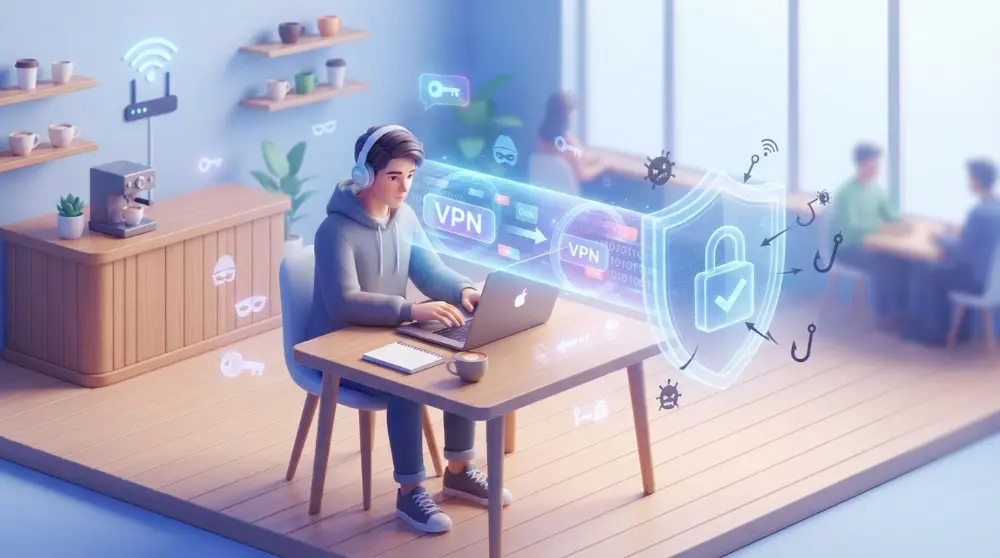
You can use a VPN for:
- Public Wi-Fi protection: It encrypts traffic between your device and the VPN server, helping protect your information on public networks.
- Private browsing: It hides your real IP address from the websites you visit.
- Protecting multiple apps: A device-wide VPN can cover traffic from different applications.
- Remote work: Employees can use corporate VPNs to connect securely to company networks.
- Accessing regional content: Connecting to a server in another country may allow access to services available there, depending on their rules and restrictions.
Remember, a VPN doesn’t guarantee complete privacy. Your online accounts, cookies, and browsing habits can still reveal information about you.
What Are the Advantages and Disadvantages of a VPN?
A VPN offers several benefits, especially when online security and privacy are important. However, it also has a few limitations.
Advantages of a VPN
- Encrypts internet traffic: It makes your data harder for outsiders to read while traveling between your device and the VPN server.
- Hides your IP address: Websites see the VPN server’s IP address instead of your original one.
- Protects public Wi-Fi connections: It adds an extra layer of protection when using networks in cafés, airports, and hotels.
- Covers multiple applications: A device-wide VPN can protect traffic from different apps.
- Supports remote work: Businesses can use VPNs to give employees secure access to internal networks.
Disadvantages of a VPN
- May reduce internet speed: Encryption and longer network routes can slow down your connection.
- Some services require payment: Many reliable VPN providers charge monthly or yearly fees.
- Not complete anonymity: Websites can still track you through cookies, account logins, and other methods.
- VPN providers require trust: Your VPN provider handles your traffic, so its privacy policy and business practices matter.
- Some websites block VPNs: Certain websites and streaming services restrict connections from known VPN servers.
A VPN is a useful privacy tool, but it’s not a complete security solution.
What Are the Advantages and Disadvantages of a Proxy?
A proxy server can be useful when you want to change your visible IP address or route traffic from a specific application through another server. However, it also has some limitations.
Advantages of a Proxy
- Hides your original IP address: Websites see the proxy server’s IP address instead of your real one.
- Can help access restricted websites: Some proxies allow you to connect through servers in different countries.
- Useful for specific applications: You can configure a proxy for a particular browser or program without changing your entire device connection.
- Free options are available: Some proxy services don’t charge users for basic access.
- Useful for businesses: Companies can use proxies to filter websites, manage traffic, and monitor network activity.
Disadvantages of a Proxy
- Usually doesn’t encrypt traffic: Most standard proxies don’t protect your data with encryption.
- Limited coverage: A browser proxy usually doesn’t cover other apps on your device.
- Free proxies can be risky: Some unknown providers may collect your browsing information or expose your data.
- Connection speed can vary: Busy or poorly maintained proxy servers may cause slow browsing.
- Limited privacy: Hiding your IP address doesn’t prevent websites from tracking you through cookies or other methods.
A proxy is useful for simple tasks, but it isn’t the best choice when you need stronger online security.
Frequently Asked Questions About VPN vs Proxy
Is a VPN better than a proxy?
Yes, a VPN is generally better when you need online privacy and security. It encrypts your internet traffic and can cover your entire device. A proxy mainly changes your visible IP address and usually doesn’t provide the same level of protection.
Is a proxy server safe to use?
A proxy server can be safe if you use a trustworthy provider. However, free and unknown proxies may collect your data or expose your internet traffic. Always check the provider’s privacy policy before using one.
Can I use a VPN and proxy at the same time?
Yes, you can use a VPN and proxy together in some setups. However, this isn’t necessary for most everyday users. Using both may also create connection problems or reduce your internet speed.
Do I need a VPN if I already have a proxy?
If you only want to change your IP address for a specific browser, a proxy may be enough. But if you want encrypted internet traffic and broader device protection, a VPN is a better choice.
Does a VPN hide my IP address?
Yes. When connected to a VPN, websites generally see the VPN server’s IP address instead of your original public IP address. However, other tracking methods can still identify you.
Is a free VPN better than a free proxy?
A trustworthy free VPN can offer better protection because it encrypts your internet traffic. However, not every free VPN is safe. Some have data limits, fewer server locations, or weak privacy policies. Always research the provider before connecting.
Can a proxy protect me on public Wi-Fi?
A standard proxy usually doesn’t encrypt your internet connection, so it shouldn’t be your main protection on public Wi-Fi. A reliable VPN provides stronger protection by encrypting traffic between your device and the VPN server.
Which is faster, a VPN or a proxy?
A proxy can sometimes be faster because most standard proxies don’t encrypt traffic. However, speed depends on server quality, distance, network conditions, and the number of users. A good VPN can also provide fast browsing speeds.
Final Thoughts: Should You Choose a VPN or Proxy?
Choosing between a VPN and a proxy isn’t difficult once you understand how they work.
A proxy is useful when you want to change your visible IP address for a specific browser or application. It’s also helpful for basic browsing, website testing, and managing internet requests.
A VPN is the better choice when you want stronger online privacy, encrypted internet traffic, and protection across multiple apps on your device.
Before choosing either option, check the provider’s reputation, privacy policy, and security features. Don’t trust a service just because it offers free access.
Simply put, use a proxy for basic IP address changes and a VPN when your privacy and internet security matter most.