Have you ever visited a website and seen a small chat box asking, “How can I help you today?” That’s probably a chatbot. You can type a question, ask for help, or get information without calling anyone or sending an email.
Chatbots are becoming a common part of our daily lives. You can find them on shopping websites, banking apps, social media platforms, and customer support pages. Some can answer simple questions, while others can understand complex requests and help you complete different tasks.
But what is a chatbot, and how does it actually work? Is every chatbot powered by artificial intelligence (AI)? And can a chatbot really understand what you’re saying?
Don’t worry! In this guide, we’ll explain everything in simple words. You’ll learn how chatbots work, the different types, real-world examples, their benefits, and how businesses use them.
What Is a Chatbot?
A chatbot is a computer program that talks with people through text or voice. It can answer questions, share information, and help users complete different tasks.
Think of it as a virtual helper that’s available through a website, mobile app, or messaging platform. Instead of speaking to a real person, you can type a message or ask a question. The chatbot then gives you a response.
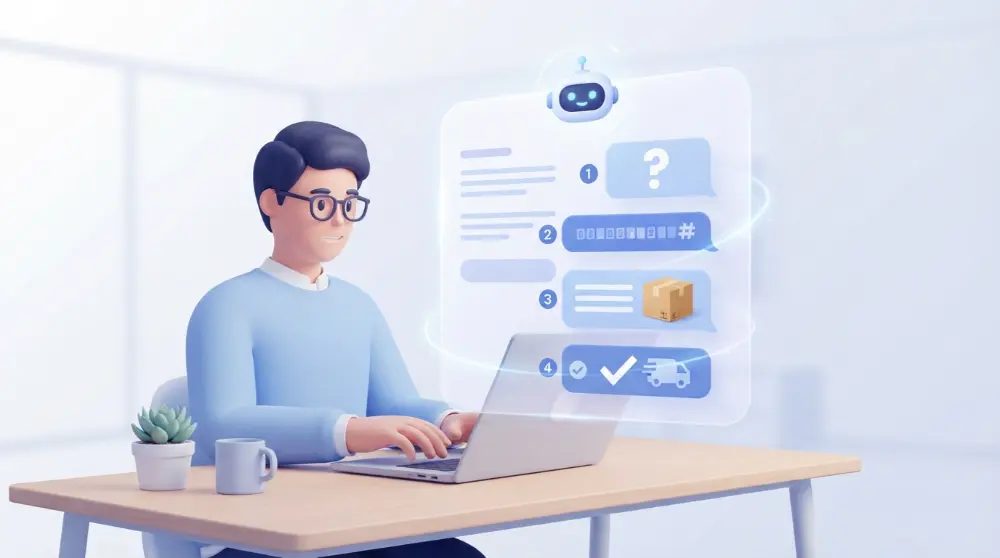
For example, imagine you’re shopping online and want to know when your order will arrive. Instead of calling customer service, you open the website’s chat box and type:
You: Where is my order?
Chatbot: I’d be happy to help! Please enter your order number.
You: #45821
Chatbot: Your order is on its way and should arrive tomorrow.
That’s a simple example of how a chatbot helps people get information quickly.
However, not all chatbots work in the same way. Some follow fixed instructions and provide answers from a prepared list. Others use artificial intelligence to understand questions and create responses based on what users say.
What Does the Word Chatbot Mean?
The word “chatbot” combines two words: chat and robot.
- Chat: A conversation between two or more people.
- Bot: A computer program that performs tasks automatically.
Together, a chatbot is a computer program designed to have conversations with people.
Chatbots don’t always need a human to reply to every message. They can handle many common questions automatically, making it easier for people to find answers.
Is Every Chatbot Powered by AI?
No. This is something many people misunderstand.
Some chatbots use simple rules and prepared answers. They can only respond to questions they have been programmed to recognize.
Other chatbots use artificial intelligence (AI), natural language processing (NLP), and large language models (LLMs). These technologies help them understand different questions and provide more flexible responses.
For example:
- A basic chatbot might show you a list of questions to choose from.
- An AI chatbot can understand a question written in your own words.
- An advanced AI chatbot may connect with other software to find information or complete tasks.
So, every AI chatbot is a chatbot, but not every chatbot uses AI.
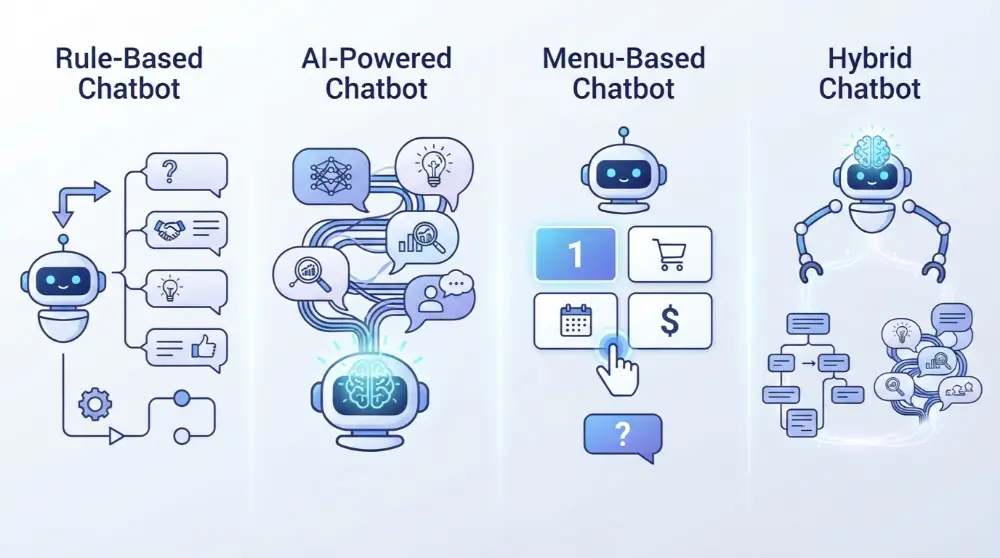
Types of Chatbots: 4 Main Types You Should Know
Not all chatbots are the same. Some can only answer simple questions, while others can understand natural language, remember conversations, and help users complete tasks.
Most chatbots fall into four common types. Let’s look at each one with simple examples.
1. Rule-Based Chatbots
Rule-based chatbots are the simplest type. They follow a set of instructions created by a developer or business owner.
They don’t understand questions like humans. Instead, they look for specific words, buttons, or choices and provide answers based on predefined rules.
For example, imagine you’re visiting a clothing store’s website. A chatbot might show these options:
- Track my order
- Return a product
- Check delivery charges
- Contact customer support
When you select “Track my order,” the chatbot follows its instructions and asks for your order number.
Main features of rule-based chatbots:
- Follow fixed rules and instructions.
- Provide prepared answers.
- Work well for simple and common questions.
- Don’t understand questions outside their programmed options.
- Are usually easy to set up and manage.
Best for: Small businesses, FAQ pages, basic customer support, and websites that receive similar questions every day.
2. AI-Powered Chatbots
AI-powered chatbots use artificial intelligence to understand questions and respond in a more natural way.
Unlike rule-based chatbots, they don’t depend only on fixed answers. They can understand different ways of asking the same question and use the conversation to create a suitable response.
For example, you might ask:
- How can I learn English?
- What’s the best way to improve my English?
- Can you help me practice English?
An AI chatbot can understand that all three questions are about learning English.
Popular examples include:
- ChatGPT.
- Claude.
- Google Gemini.
- Microsoft Copilot.
Main features of AI-powered chatbots:
- Understand natural language.
- Answer different types of questions.
- Generate responses based on user input.
- Handle follow-up questions.
- Support more flexible conversations.
Best for: Customer support, learning, writing help, research, and answering questions that need more than a fixed response.
3. Menu-Based Chatbots
Menu-based chatbots guide users through a conversation using buttons and ready-made choices.
Instead of typing a full question, users select an option from the screen. The chatbot then shows another set of choices based on their selection.
For example:
Chatbot: Welcome! What would you like help with?
- Product information
- Payment problems
- Delivery status
- Returns and refunds
If you select “Delivery status,” the chatbot may ask you to enter your tracking number.
This makes the conversation simple because users don’t need to think about what to type.
Main features of menu-based chatbots:
- Show ready-made options.
- Guide users step by step.
- Reduce typing and confusion.
- Work well for common requests.
- Offer limited freedom during conversations.
Best for: Online stores, booking websites, restaurants, and businesses that want to guide visitors through simple tasks.
4. Hybrid Chatbots
Hybrid chatbots combine rule-based features with AI technology.
They use prepared responses for common questions but can also use AI to understand more flexible requests.
For example, a customer might ask about a company’s return policy. The chatbot can provide a prepared answer. But if the customer asks a more detailed question, AI can help understand the request and provide a suitable response.
Some hybrid chatbots can also connect users with human support when they can’t solve a problem.
Main features of hybrid chatbots:
- Combine fixed rules and AI.
- Answer common questions quickly.
- Handle more flexible conversations.
- Guide users through different tasks.
- Can transfer difficult requests to human agents.
Best for: Businesses that need both simple automated support and more advanced conversations.
Which Type of Chatbot Is Best?
The right choice depends on what you want your chatbot to do.
| Chatbot type | Best use |
|---|---|
| Rule-based | Simple questions and FAQs |
| AI-powered | Natural conversations and detailed answers |
| Menu-based | Guided choices and basic tasks |
| Hybrid | A mix of automated and AI support |
If you only need to answer a few common questions, a rule-based or menu-based chatbot may be enough. But if you want to handle different questions and understand customer needs, an AI-powered or hybrid chatbot may be a better choice.
How Do Chatbots Work?
A chatbot works by receiving a message from a user, understanding what the person wants, and providing a suitable response.
The exact process depends on the type of chatbot. A basic chatbot follows fixed instructions, while an AI chatbot uses artificial intelligence to understand more detailed questions.
Let’s break the process into simple steps.
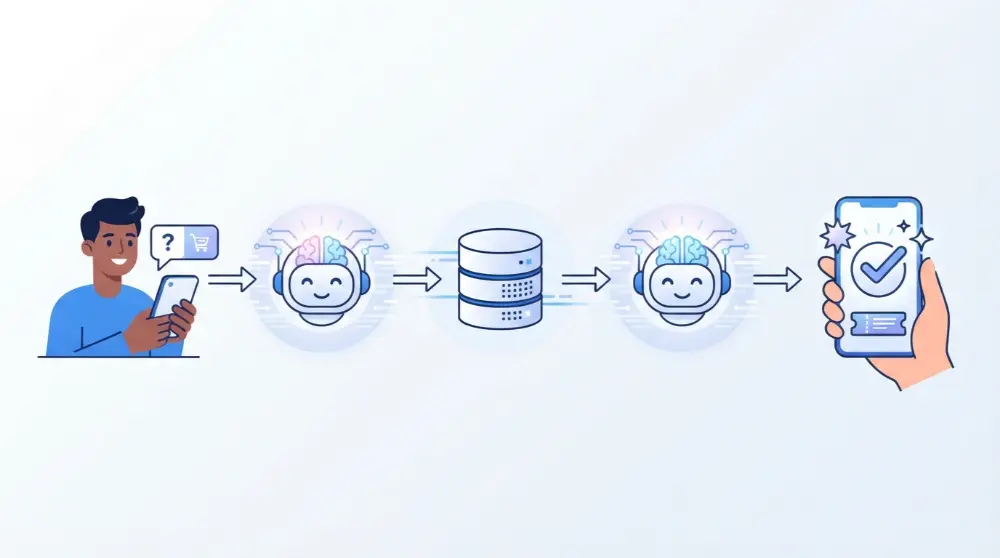
Step 1: The User Sends a Message
Everything starts when someone sends a message to the chatbot.
You might type a question, click a button, or speak through a microphone.
For example:
“How much does your delivery cost?”
The chatbot receives your message and starts processing it.
Step 2: The Chatbot Understands the Request
Next, the chatbot tries to understand what you’re asking.
A rule-based chatbot checks your message against its programmed keywords and instructions.
An AI chatbot uses technologies like Natural Language Processing (NLP) and Natural Language Understanding (NLU) to identify the meaning behind your words.
For example, it may understand that you’re asking about delivery charges, even if you write:
“What’s the shipping fee?”
Step 3: The Chatbot Finds an Answer
After understanding your request, the chatbot looks for the right information.
Depending on how it’s designed, it may:
- Select an answer from a prepared list.
- Search its knowledge base.
- Use an AI model to generate a response.
- Connect with a database to find information.
- Access business software to retrieve details.
For example, a shopping chatbot may check an order database to find your delivery information.
Step 4: The Chatbot Sends a Response
Once the chatbot has an answer, it sends a reply through the same chat window.
For example:
You: What’s the shipping fee?
Chatbot: Standard delivery costs $5. Free delivery is available on orders over $50.
AI chatbots can also remember earlier messages in a conversation. This helps them answer follow-up questions without asking users to repeat everything.
Step 5: The Chatbot Helps Complete a Task
Some chatbots do more than answer questions. They can also help users complete simple tasks.
For example, a chatbot connected to a booking system might:
- Ask which date you prefer.
- Show available appointment times.
- Ask you to select a time.
- Save your booking.
- Send a confirmation message.
This is possible because the chatbot can connect with other software and business systems.
In simple words: A chatbot receives your message, understands what you need, finds the right information, and sends a response. More advanced chatbots can also take action.
What Technologies Do Chatbots Use?
Modern chatbots use different technologies to understand messages and provide useful answers. Not every chatbot needs all these technologies. It depends on how advanced the system is.
Here are some important technologies behind AI chatbots.
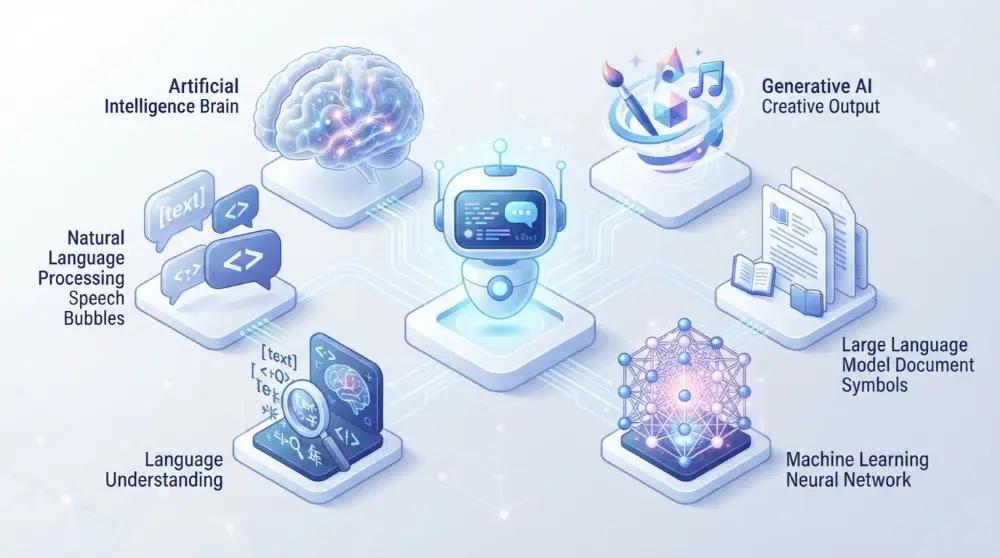
1. Artificial Intelligence (AI)
Artificial intelligence allows computers to perform tasks that usually need human-like thinking, such as understanding language, finding patterns, and making decisions.
AI helps chatbots handle different questions instead of depending only on prepared answers.
For example, an AI chatbot can understand a question even when someone writes it in a different way.
2. Natural Language Processing (NLP)
Natural Language Processing helps computers work with human language.
People don’t always write perfect sentences. They may use short words, spelling mistakes, or different ways to ask the same question.
NLP helps chatbots process written and spoken language so they can respond more naturally.
For example:
- “Where’s my order?”
- “Can you check my delivery?”
- “When will my package arrive?”
These questions use different words but have a similar meaning.
3. Natural Language Understanding (NLU)
Natural Language Understanding is a part of NLP that focuses on understanding the meaning and purpose of a message.
It helps chatbots identify what users actually want instead of only looking for matching words.
For example, if someone says, “I can’t log in to my account,” the chatbot can recognize that the person needs login support.
4. Machine Learning (ML)
Machine Learning allows computer systems to learn patterns from data during training.
It helps AI models recognize language patterns and improve how they handle different types of requests.
Many advanced chatbots use machine learning to support better language understanding and response generation.
5. Large Language Models (LLMs)
Large Language Models are AI models trained on large amounts of text. They can understand prompts, recognize language patterns, and generate responses.
Many popular AI chatbots use LLMs to have natural conversations.
For example, ChatGPT and Claude use large language models to answer questions, explain topics, and help with different tasks.
6. Generative AI
Generative AI allows chatbots to create new responses instead of choosing only from a fixed list.
For example, you can ask an AI chatbot to explain a difficult topic in simple English. It can generate an explanation based on your request.
This makes modern AI chatbots more flexible and useful for different situations.
What Are Chatbots Used For? 8 Common Uses in Daily Life
Chatbots are used in many places, from online shopping websites to banking apps and social media platforms. They help people find information, get support, and complete everyday tasks without waiting for a human representative.
Businesses also use chatbots to save time and make their services easier to access.
Here are eight common ways people and businesses use chatbots.
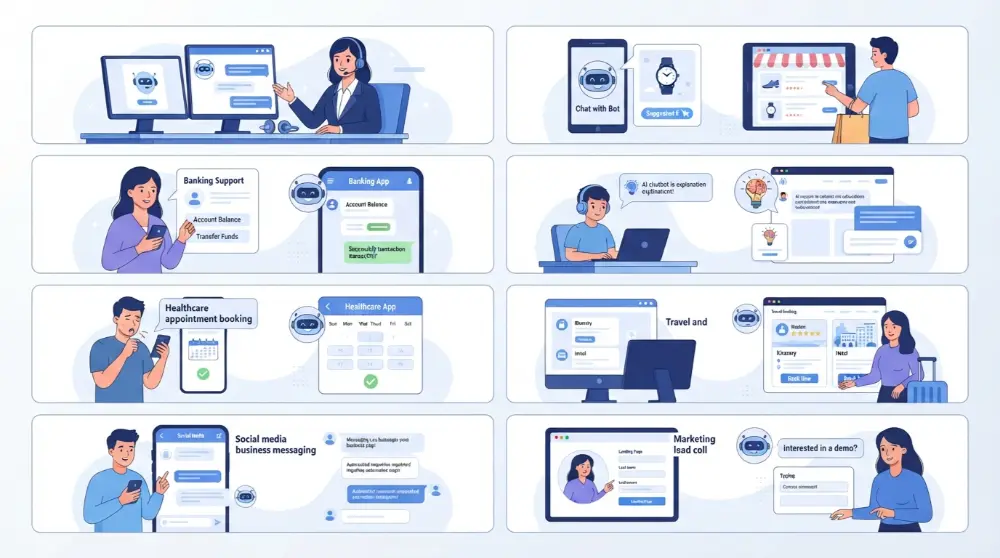
1. Customer Service and Support
Customer service is one of the most common uses of chatbots.
Many businesses receive the same questions every day. Instead of asking employees to answer every message, they use chatbots to handle simple requests.
For example, a customer may ask:
- What are your business hours?
- How can I return a product?
- Where is my order?
- How can I contact your support team?
The chatbot can provide answers within seconds. If the problem is too difficult, it can connect the customer with a human support agent.
This helps businesses respond to common questions without making customers wait too long.
2. Online Shopping and E-Commerce
Online stores use chatbots to help shoppers find products and make buying decisions.
Imagine you’re shopping for a new laptop but don’t know which one to choose. You can ask the chatbot for suggestions based on your needs and budget.
An e-commerce chatbot may help with:
- Finding products.
- Comparing different items.
- Checking product availability.
- Understanding delivery charges.
- Tracking orders.
- Learning about return policies.
Some advanced chatbots can also connect with store systems to check stock and help customers complete purchases.
3. Banking and Financial Services
Banks and financial companies use chatbots to provide basic customer support.
Instead of visiting a bank branch or waiting on a phone call, customers can use a chatbot to get answers to common questions.
For example, a banking chatbot may help users:
- Find information about bank services.
- Learn about account opening.
- Check general transaction information.
- Understand card services.
- Get help with common banking problems.
However, banking chatbots must follow strong security rules because they may deal with private financial information. Users should never share passwords, PINs, or other sensitive details unless they’re using a verified and secure banking process.
4. Education and Online Learning
Chatbots are also useful for students, teachers, and online learning platforms.
Students can ask questions, get explanations, and practice different subjects. An AI chatbot can explain a difficult topic in simple words or provide examples to make learning easier.
For example, a student might ask:
“Can you explain photosynthesis in simple English?”
The chatbot can provide an easy explanation without requiring the student to search through several websites.
Educational chatbots can help with:
- Answering study questions.
- Explaining difficult topics.
- Practicing languages.
- Creating practice questions.
- Finding learning resources.
- Providing basic study guidance.
Still, students should check important facts because AI chatbots can sometimes provide incorrect information.
5. Healthcare and Appointment Booking
Healthcare providers can use chatbots to make basic services easier to access.
For example, a patient may use a chatbot to ask about clinic hours or book an appointment with a doctor.
Healthcare chatbots can help with:
- Booking appointments.
- Sharing clinic information.
- Sending appointment reminders.
- Providing general health information.
- Helping patients find the right department.
However, chatbots shouldn’t replace qualified healthcare professionals. They may provide general information, but medical decisions should be made with the help of a qualified professional.
6. Travel and Hotel Booking
Travel companies use chatbots to help customers plan trips and manage bookings.
For example, you might ask a travel chatbot to find information about flights, hotel rooms, or travel policies.
It may help with:
- Finding flight information.
- Checking hotel details.
- Understanding booking policies.
- Answering travel-related questions.
- Sending booking reminders.
- Providing information about cancellations.
Some advanced systems can connect with booking platforms to help customers manage reservations.
7. Social Media and Messaging Apps
Chatbots are widely used on messaging platforms such as WhatsApp and Facebook Messenger.
Businesses use them to answer customer messages, share product details, and provide basic support.
For example, if someone sends a message to a clothing store asking about a product, the chatbot can share its price, available sizes, and delivery information.
This helps businesses manage customer messages without replying to every question manually.
8. Marketing and Lead Generation
Businesses also use chatbots to connect with potential customers.
When someone visits a website, a chatbot can ask what they’re looking for and provide useful information about available services.
For example:
Chatbot: Are you looking for SEO services?
Visitor: Yes, I need help improving my website rankings.
Chatbot: Great! What’s your website address?
The chatbot can collect basic information and send it to the sales team for follow-up.
Businesses may use chatbots to:
- Answer questions about services.
- Collect customer details.
- Qualify potential leads.
- Share offers and promotions.
- Schedule sales calls.
- Guide visitors toward the right service.
This makes it easier for businesses to connect with people who are interested in their products or services.
Where Can You Find Chatbots?
You don’t need special software to see how chatbots work. Many websites and apps already include them.
Here are some common places where you may find chatbots:
| Platform | Common chatbot use |
|---|---|
| Websites | Customer support and FAQs |
| Business messages and order updates | |
| Facebook Messenger | Product questions and customer support |
| Banking apps | Basic account and service help |
| Shopping apps | Product suggestions and order tracking |
| Education apps | Learning assistance |
| Travel websites | Booking information and support |
The main goal is to make communication easier and help people get information without going through long menus or waiting for someone to reply.
What Are the Benefits of Chatbots?
Chatbots offer several benefits for both businesses and customers. They make communication easier, save time, and help people find information without waiting for a human representative.
Small businesses, large companies, online stores, and service providers can all use chatbots to improve the way they communicate with customers.
Let’s look at some of their biggest benefits.
1. Available 24 Hours a Day
One of the biggest benefits of chatbots is that they can work around the clock.
Unlike human employees, chatbots don’t need breaks or fixed working hours. Customers can ask questions at any time, even at night or during holidays.
For example, if someone visits an online store at midnight and wants to know about delivery charges, a chatbot can provide an answer immediately.
This is especially useful for businesses that serve customers in different time zones.
2. Faster Customer Support
Nobody likes waiting too long for an answer.
Chatbots can respond to common questions within seconds. Customers don’t need to wait in a phone queue or send an email and hope for a quick reply.
For example, a customer can ask about a return policy and get the information directly through the website’s chat window.
This makes customer support quicker and easier.
3. Saves Time and Reduces Repeated Work
Customer support teams often answer the same questions every day.
A chatbot can handle many of these repeated requests automatically. This gives employees more time to focus on problems that need personal attention.
For example, instead of manually answering questions about business hours, a chatbot can provide the information whenever someone asks.
4. Handles Multiple Conversations
A human support agent can only manage a limited number of conversations at once.
A chatbot can handle many conversations at the same time, depending on its software and available resources.
For example, an online store may receive messages from hundreds of visitors during a sale. A chatbot can help answer common questions without making every customer wait for an employee.
5. Improves Customer Experience
People want quick and simple ways to get help.
Chatbots make it easier for customers to find answers, check information, and complete basic tasks.
For example, a hotel chatbot can help visitors learn about room availability, check-in times, and booking policies.
When customers can find the information they need without unnecessary steps, their overall experience can improve.
6. Helps Businesses Save Money
Chatbots can reduce the amount of time employees spend handling repeated questions.
This may help businesses manage support work more efficiently. However, chatbots still need software, setup, maintenance, and sometimes paid services.
The actual savings depend on the chatbot’s cost and how much work it can handle.
7. Provides Consistent Answers
A chatbot can provide the same approved information to different customers.
For example, if a company has a fixed return policy, its chatbot can share that information whenever someone asks about returns.
This helps reduce confusion caused by different employees giving different answers.
8. Collects Useful Customer Information
Some chatbots can collect information during conversations.
For example, a business chatbot might ask visitors about their needs, preferred services, or contact details.
Businesses can use this information to understand customer questions and improve their services. They should also protect personal information and explain how it will be used.
What Are the Disadvantages of Chatbots?
Although chatbots are useful, they aren’t perfect. They have some limitations that businesses and users should understand before depending on them.
Here are some common disadvantages.
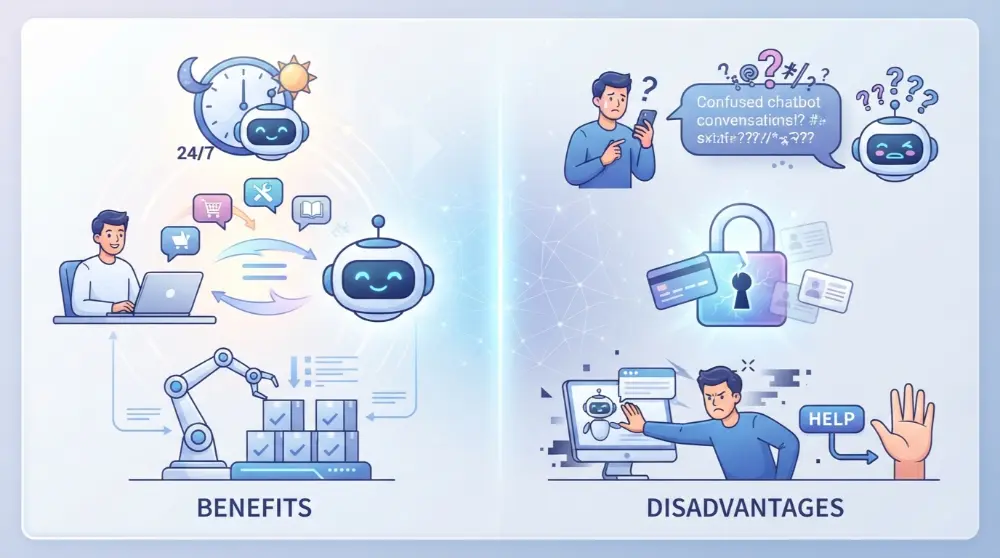
1. They Don’t Understand Everything
Basic chatbots can only answer questions they have been programmed to handle.
Even AI chatbots may misunderstand unclear questions, unusual wording, or requests that need more context.
For example, if a customer explains a complicated delivery problem, the chatbot may not understand exactly what went wrong.
2. AI Chatbots Can Give Wrong Answers
AI chatbots sometimes provide information that sounds correct but is actually wrong.
This can happen when they misunderstand a question or don’t have access to reliable information.
For example, an AI chatbot might give an incorrect answer about a company’s refund policy.
That’s why important information should be checked before making decisions based on a chatbot’s response.
3. They Lack Human Emotions
Chatbots can use friendly language, but they don’t have real human feelings.
They may struggle to understand situations where customers need sympathy, patience, or personal attention.
For example, someone dealing with a serious banking problem may prefer speaking with a real person instead of a chatbot.
4. Setup and Maintenance Can Be Difficult
Building a chatbot takes planning and effort.
Businesses need to prepare answers, create conversation flows, connect useful tools, and test how the chatbot responds.
They also need to update its information when products, prices, or company policies change.
5. Privacy and Security Risks
Some chatbots collect personal information, such as names, email addresses, phone numbers, and order details.
If this information isn’t protected properly, it may create privacy and security problems.
Businesses should use secure systems, limit access to sensitive information, and follow applicable data protection rules.
6. Not Every Customer Likes Chatbots
Some people prefer talking to a real person.
They may find automated conversations confusing, especially when the chatbot keeps repeating the same answers or doesn’t provide a way to contact customer support.
A good chatbot should always offer a clear option to speak with a human when needed.
Chatbots vs. Human Customer Support: What’s the Difference?
Chatbots and human support agents both help customers, but they work in different ways.
A chatbot is useful for quick answers and repeated tasks, while a human agent can understand more complex situations and provide personal attention.
| Feature | Chatbot | Human support |
|---|---|---|
| Availability | Can work 24/7 | Usually follows work hours |
| Response time | Often very fast | May involve waiting |
| Repeated questions | Handles them automatically | Requires employee time |
| Complex problems | May struggle | Can use human judgment |
| Personal attention | Limited | More flexible |
| Multiple conversations | Can handle many at once | Limited by staff capacity |
Which one is better?
Neither option is perfect for every situation. Many businesses get better results by combining both.
A chatbot can handle simple questions, while human employees deal with difficult problems that need personal attention.
What Is the Difference Between a Chatbot, AI Assistant, and AI Agent?
People often use the terms chatbot, AI assistant, and AI agent as if they mean the same thing. However, they have different purposes and abilities.
All three can communicate with people through natural language, but they don’t always perform the same tasks.
Let’s understand the differences.
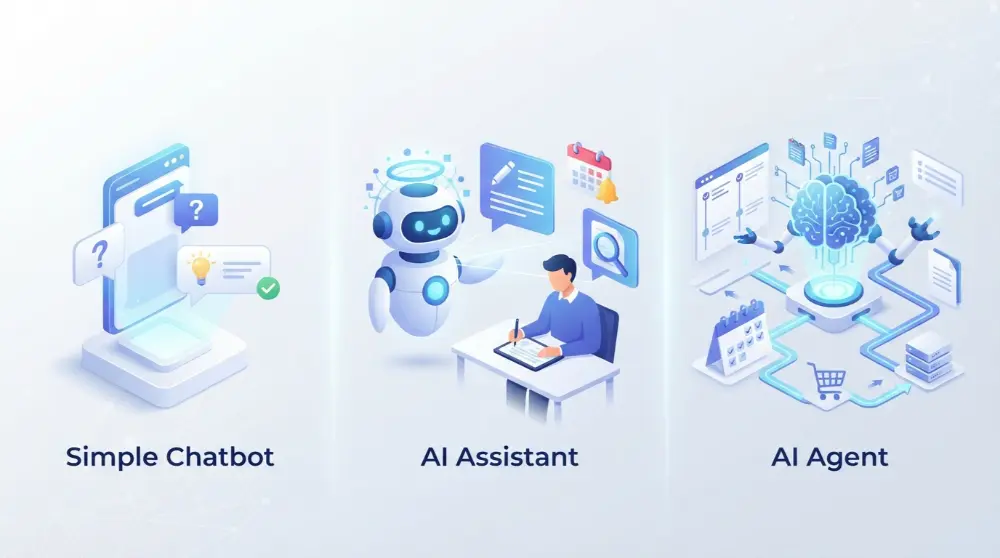
1. Chatbot
A chatbot is a computer program designed to communicate with users through text or voice.
Its main purpose is to answer questions, provide information, and help people with specific tasks.
For example, a website chatbot can answer questions about delivery charges, return policies, or product details.
Most traditional chatbots follow fixed instructions, while AI chatbots can understand more flexible questions.
2. AI Assistant
An AI assistant can do more than answer questions. It can help users with different everyday tasks.
For example, an AI assistant may help you:
- Write emails and messages.
- Create reminders.
- Search for information.
- Manage your schedule.
- Prepare documents.
- Organize daily tasks.
Popular examples include Apple Siri, Amazon Alexa, and Google Gemini.
3. AI Agent
An AI agent is designed to work toward a goal by making decisions and completing multiple steps.
Unlike a basic chatbot that mainly responds to messages, an AI agent can use connected tools and software to perform actions.
For example, imagine you want to organize a business meeting.
An AI agent might:
- Check available calendar times.
- Find a suitable meeting slot.
- Prepare a meeting invitation.
- Send the invitation if it has permission.
- Update the calendar.
This allows it to complete a larger task instead of only explaining how to do it.
Chatbot vs. AI Assistant vs. AI Agent
Here’s a simple comparison:
| Feature | Chatbot | AI Assistant | AI Agent |
|---|---|---|---|
| Main purpose | Answer questions | Help with different tasks | Complete goals |
| Conversation | Yes | Yes | Often |
| Understands natural language | Depends on type | Usually | Usually |
| Uses external tools | Sometimes | Sometimes | Often |
| Completes multiple steps | Limited | Depends on capabilities | Designed for it |
| Example | Website support bot | Siri or Gemini | Task automation agent |
Remember: These categories can overlap. Some modern AI products combine chatbot, assistant, and agent features in one system.
What Are Some Popular Chatbot Examples?
You probably use chatbots more often than you realize. Some are designed for general conversations, while others focus on customer support, shopping, or specific tasks.
Here are some well-known examples.
1. ChatGPT
ChatGPT is an AI-powered chatbot developed by OpenAI.
It allows users to ask questions and receive responses on many different topics.
People use ChatGPT for:
- Writing and editing content.
- Learning new subjects.
- Answering questions.
- Generating ideas.
- Explaining difficult topics.
- Helping with coding.
It can also work with supported tools and features to help users complete more advanced tasks.
Official website: ChatGPT.
2. Google Gemini
Google Gemini is Google’s AI assistant.
It helps users find information, understand topics, generate content, and work with different types of information.
Common uses include:
- Answering questions.
- Writing and summarizing text.
- Learning and research.
- Generating ideas.
- Working with images and other supported content.
Official website: Google Gemini.
3. Claude
Claude is an AI chatbot developed by Anthropic.
It’s commonly used for writing, analyzing information, explaining complex topics, and helping with coding tasks.
Some common uses include:
- Drafting articles and documents.
- Summarizing long text.
- Understanding information.
- Writing and reviewing code.
- Brainstorming ideas.
Official website: Claude.
4. Microsoft Copilot
Microsoft Copilot is an AI-powered assistant from Microsoft.
It helps people answer questions, create content, find information, and work with supported Microsoft products.
People may use it for:
- Writing emails.
- Summarizing information.
- Creating ideas.
- Finding answers.
- Improving productivity.
Its available features depend on the version and subscription.
Official website: Microsoft Copilot.
5. Siri
Siri is Apple’s virtual assistant.
Unlike traditional text-based chatbots, Siri mainly allows users to interact through voice commands, although text interaction is also supported on compatible devices.
You can use Siri to:
- Set alarms.
- Make calls.
- Send messages
- Ask general questions.
- Open applications.
- Control supported smart devices.
Official website: Apple Siri.
6. Amazon Alexa
Amazon Alexa is a voice-based virtual assistant commonly used with Amazon Echo devices.
It helps users control supported smart home devices and perform everyday tasks.
Common uses include:
- Playing music.
- Checking the weather.
- Setting reminders.
- Controlling smart lights.
- Asking general questions.
Official website: Amazon Alexa.
These examples show that chatbots and conversational assistants can serve many different needs. Some focus on answering questions, while others help users manage everyday activities.
How Can Businesses Use Chatbots?
Chatbots aren’t only useful for large companies. Small businesses, online stores, startups, and service providers can also use them to communicate with customers and manage everyday tasks.
The best part is that businesses don’t always need complicated technology to get started. A simple chatbot can answer common questions, while a more advanced one can connect with other business tools.
Here are some practical ways businesses can use chatbots.
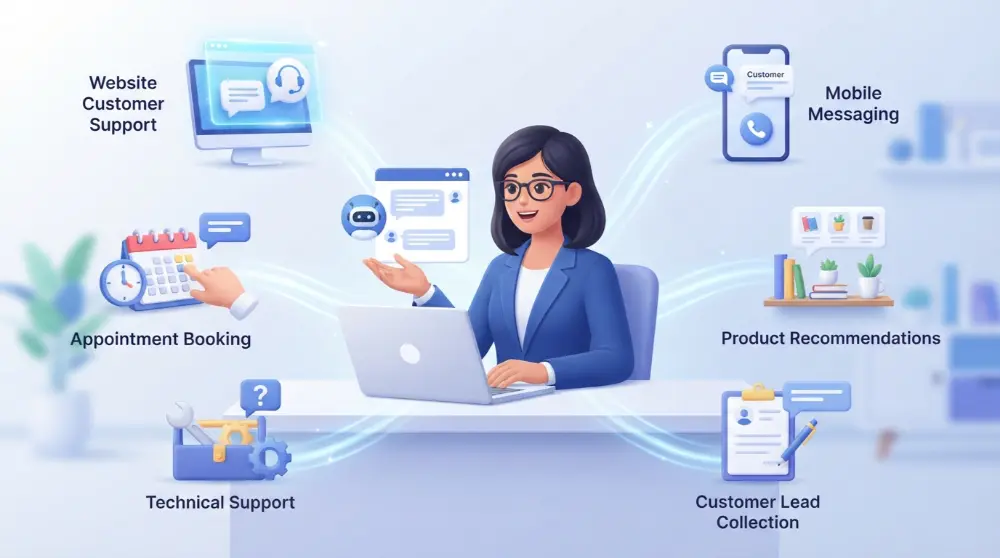
1. Add a Chatbot to a Business Website
A website chatbot can help visitors find information without searching through different pages.
For example, if someone visits a digital marketing company’s website, the chatbot can ask:
“How can we help you today?”
Visitors can choose from options such as:
- SEO services
- Website development
- Pricing information
- Contact support
The chatbot can then share relevant information or guide visitors to the right page.
This is useful for businesses that receive regular questions from website visitors.
2. Use Chatbots on WhatsApp
Many businesses use WhatsApp to communicate with customers.
A WhatsApp chatbot can automatically respond to common messages, share product information, and provide order updates.
For example, a customer might send:
“Do you have this sofa in brown?”
The chatbot can provide available colors, product details, and pricing information if it’s connected to the business’s product data.
This helps businesses manage customer messages more efficiently.
3. Automate Appointment Bookings
Service-based businesses can use chatbots to make appointment booking easier.
For example, a dental clinic can use a chatbot to ask patients about their preferred date and time.
The chatbot can then check available appointments through a connected booking system and help complete the reservation.
This can be useful for:
- Dental clinics
- Beauty salons
- Medical centers
- Fitness trainers
- Consulting services
4. Help Customers Find Products
Online stores can use chatbots as virtual shopping assistants.
Instead of browsing hundreds of products, customers can explain what they’re looking for.
For example:
Customer: I need wireless headphones under $50.
Chatbot: Sure! Do you prefer headphones for gaming, music, or everyday use?
Based on the customer’s answers, the chatbot can suggest suitable products.
This makes shopping easier and helps visitors find relevant items.
5. Provide Technical Support
Software companies and technology businesses often receive questions about installation, login problems, and product features.
A chatbot can provide basic troubleshooting instructions and guide users through common problems.
For example, if someone can’t access their account, the chatbot can explain how to reset their password.
If the issue needs more technical help, it can create a support ticket or connect the user with an employee.
6. Collect Leads From Website Visitors
A chatbot can help businesses collect information from people who are interested in their services.
For example, a real estate company can use a chatbot to ask visitors:
- Are you looking to buy or rent?
- Which area are you interested in?
- What’s your budget?
- When do you plan to move?
The answers can help the sales team understand what the visitor needs and follow up with relevant information.
However, businesses should only collect information they actually need and handle it responsibly.
How to Create a Simple Chatbot for Your Business
Creating a chatbot may sound difficult, but you don’t always need coding skills to get started.
Many chatbot platforms provide ready-made templates and visual tools that let you create conversations without writing code.
Here’s a simple process to follow.
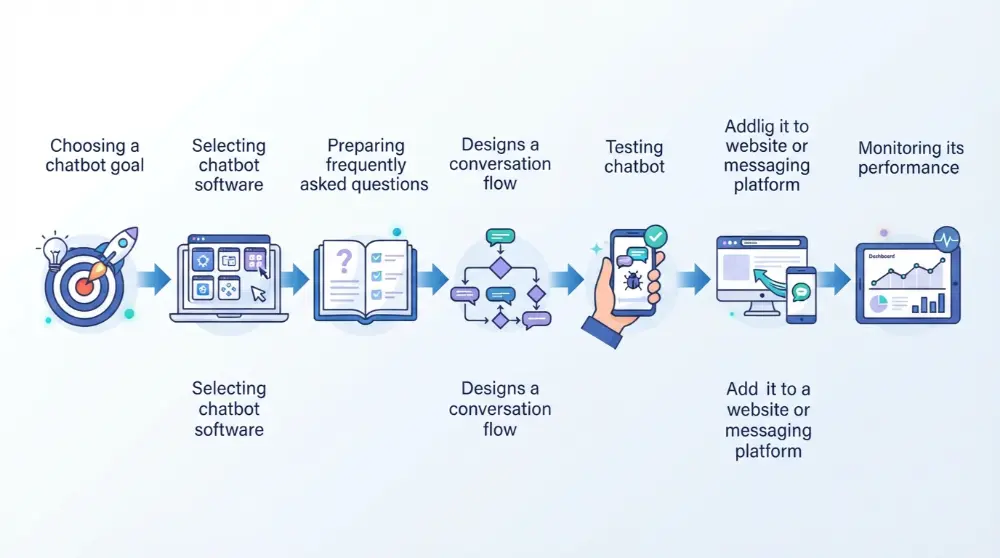
Step 1: Decide What You Want the Chatbot to Do
Before choosing any software, decide why you need a chatbot.
Do you want it to answer customer questions, collect leads, share product details, or help with bookings?
Start with one clear purpose. This makes the setup easier and helps you avoid unnecessary features.
Step 2: Choose a Chatbot Platform
Next, select a platform that matches your needs.
Some platforms focus on website support, while others help businesses create AI-powered conversations across messaging apps.
Popular options include:
- Manychat.
- Tidio.
- Botpress.
- Dialogflow.
Compare their features, pricing, integrations, and ease of use before choosing one.
Step 3: Prepare Questions and Answers
Think about the questions your customers ask most often.
For example, an online store might receive questions about:
- Delivery charges
- Payment methods
- Product availability
- Return policies
- Order tracking
Prepare clear answers for these questions so your chatbot can provide useful information.
Step 4: Create the Conversation Flow
Now, decide how the chatbot should communicate with visitors.
A simple conversation might look like this:
Chatbot: Welcome! How can I help you?
Options:
- Product information
- Delivery details
- Returns and refunds
- Speak to an agent
Create a clear path for each option so visitors can easily find what they need.
Step 5: Test Your Chatbot
Before making your chatbot available to customers, test it with different questions.
Check whether it:
- Provides correct answers.
- Understands common requests.
- Shows the right options.
- Works properly on mobile devices.
- Transfers difficult questions to a human.
Fix any problems you find during testing.
Step 6: Add It to Your Website or Messaging App
Once everything works properly, connect your chatbot to the platform where customers can use it.
Depending on the software, you may be able to add it to your website, WhatsApp, Facebook Messenger, or another supported channel.
Step 7: Monitor and Improve It
Creating a chatbot isn’t the final step.
Check the conversations regularly to understand where users get stuck and which questions the chatbot cannot answer.
Update its information and improve its responses as your business changes.
A well-maintained chatbot can become a useful part of your customer support system.
How to Choose the Right Chatbot and What to Know Before Using One
Not every chatbot is right for every person or business. Some chatbots answer simple questions, while others can handle bookings, customer support, and more complex tasks.
Before choosing a chatbot, think about what you want it to do.
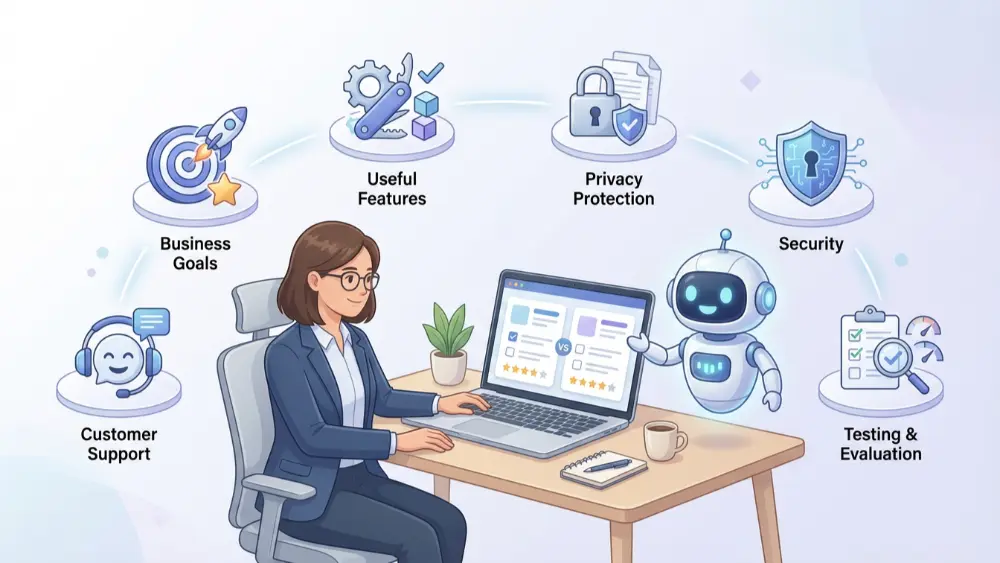
1. Choose a Chatbot Based on Your Goal
Start by deciding why you need a chatbot.
- For customer support: Choose a chatbot that can answer common questions and guide customers.
- For online stores: Look for one that can help people find products, check orders, and answer shopping questions.
- For appointment bookings: Choose a chatbot that can collect customer details and manage bookings.
- For learning: Use an AI chatbot that can explain topics and answer study questions.
- For business automation: Look for a chatbot that can connect with your existing tools and complete simple tasks.
2. Check Its Features
A good chatbot should be easy to use and offer the features you need. Check whether it supports your preferred language, works on mobile devices, and connects with your website or messaging apps.
You should also check whether it can transfer a conversation to a human when it cannot help.
3. Think About Privacy and Security
Some chatbots collect information such as names, email addresses, phone numbers, and order details. Before using one, understand what information it collects and how that information is stored.
For businesses, it’s important to avoid collecting unnecessary personal information. Use trusted chatbot providers and review their privacy and security settings.
4. Test the Chatbot Before Using It
Don’t add a chatbot to your website without testing it first. Ask common questions and check its answers.
Make sure it can handle simple requests, explain when it doesn’t know something, and send difficult questions to a human support team.
A chatbot should make communication easier, not create more problems.
Frequently Asked Questions About Chatbots
What is a chatbot in simple words?
A chatbot is a computer program that talks with people through text or voice. You can ask questions, get information, and sometimes complete tasks without speaking to a human.
Is ChatGPT a chatbot?
Yes. ChatGPT is an AI-powered chatbot. It can answer questions, explain topics, help with writing, and assist with many other tasks through conversation.
Is Google Gemini a chatbot?
Yes. Google Gemini is an AI-powered conversational tool. People can use it to ask questions, understand information, and get help with different tasks.
Do chatbots use artificial intelligence?
Some chatbots use artificial intelligence, while others follow fixed rules. Rule-based chatbots give answers based on set instructions. AI chatbots can understand different ways of asking questions and create more flexible responses.
Can a chatbot replace human customer support?
A chatbot can handle common questions and simple tasks, but it can’t replace human support in every situation. People are still important when a problem is difficult, sensitive, or needs personal attention.
Are chatbots free to use?
Some chatbots offer free versions, while others charge for extra features or business use. The cost depends on the chatbot provider, its features, and how you plan to use it.
Do chatbots need the internet?
Most online chatbots need an internet connection because they communicate with online services. Some basic chatbot programs can work without the internet, depending on how they are built.
Final Thoughts
Chatbots have made it easier for people and businesses to communicate. They can answer questions, provide information, help customers, and complete simple tasks.
Some chatbots follow fixed rules, while AI-powered chatbots can understand natural language and provide more flexible answers. The right choice depends on your needs.
If you’re a business owner, a chatbot can help you respond to customers faster and manage repeated questions. If you’re an everyday user, it can save time when you need quick information or help with a task.
The key is to use chatbots for the work they can handle and involve a human when personal attention is needed.