
Have you ever tried connecting an app to another service and been asked to enter an API key? Maybe you wanted to use ChatGPT in another tool, connect a weather app to an external service, or add Google Maps to your website.
If you’re new to APIs, this little code can look confusing. What is it? Why do you need it? And what happens if someone else gets access to it?
An API key is a unique code that helps an application identify itself when sending requests to another service. It allows the service provider to recognize the project making the request, track its usage, and apply access rules.
Think of it like a library card. You show your card when you visit a library so the staff can check your account. In a similar way, an application sends an API key when it wants to use another service.
In this guide, you’ll learn what an API key is, how it works, why developers use it, and how to keep it safe. We’ll also look at real examples from services like OpenAI and Google Maps.
What Is an API Key?
An API key is a unique string of letters, numbers, and sometimes special characters. It’s created by an API provider and given to a developer or project.
When an application wants to connect to an API, it sends a request with its API key. The receiving service checks the key and applies its rules before processing the request.
For example, imagine you’re building a weather website. You want to show live weather details without collecting weather information yourself.
Here’s what happens:
- You sign up with a weather API provider.
- The provider gives you an API key.
- You add that key to your application.
- Your application sends a request to the weather API.
- The API checks the request and returns weather information if it’s allowed.
The API key helps the provider identify which project is making the request. It can also help track how much data the project uses and whether it has reached its allowed limit.
Important: An API key isn’t always proof of a person’s identity. Many standard API keys identify a project or application rather than an individual user. Some services require extra security methods, such as OAuth tokens, to verify users and control access.
In simple words, an API key is like an access card for a software project. It helps an application connect with another service under the provider’s rules.

What Does API Key Stand For?
API stands for Application Programming Interface.
An API is a set of rules that allows two software programs to communicate with each other. It tells applications how to send requests and receive information.
A key is a unique code used to identify a project or provide access, depending on the API service.
So, an API key is a code that an application uses when communicating with an API.
For example:
- A weather app uses a weather API to get forecast information.
- A website uses the Google Maps API to show maps.
- An AI tool uses an AI API to send questions and receive answers.
- An online store uses a payment API to process transactions.
Without an API, developers may need to build many features themselves. APIs make it easier to connect existing services and add useful features to applications.
How Does an API Key Work?
An API key works by identifying the application that sends a request to another service. When the application asks for information, it includes the key so the API provider can check where the request came from.
Let’s understand this with a simple example.
Imagine you have a website that shows the latest weather in different cities. Instead of collecting weather data yourself, you connect your website to a weather service.
Here’s how the process works:
- You create an account: First, you sign up with a weather API provider.
- You generate an API key: The provider creates a unique key for your project.
- Your application sends a request: When someone visits your website, your application requests weather information from the API.
- The API checks the key: The provider checks whether the key is valid and whether the request follows its rules.
- The API sends a response: If the request is allowed, the API returns the requested weather information.
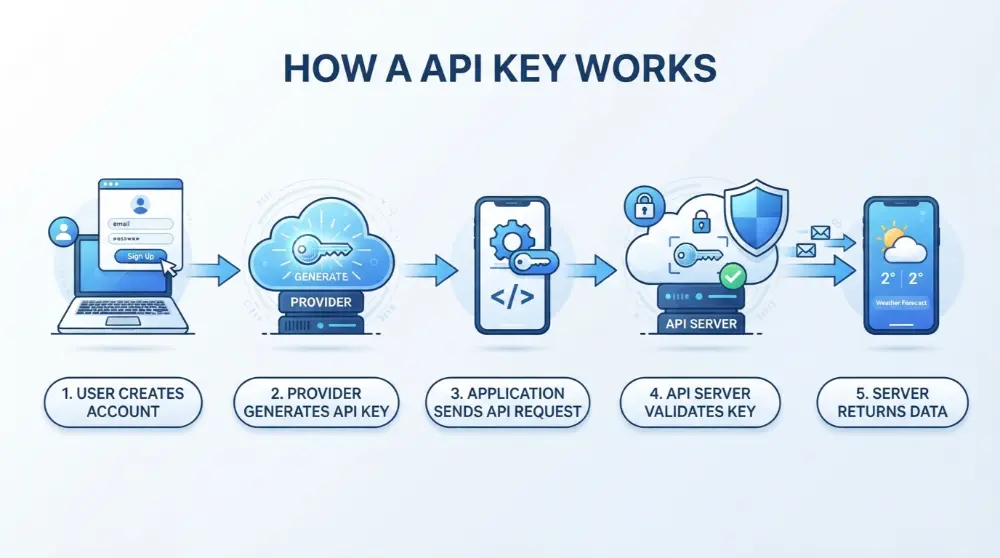
That’s the basic process. However, the exact steps can differ depending on the API provider and its security system.
Step 1: An Application Requests Information
First, an application needs something from another service.
For example, a weather website needs the current temperature in Karachi. It sends a request to the weather API asking for that information.
Step 2: The Application Sends Its API Key
The application includes its API key with the request. Many APIs accept keys through HTTP headers, while others may support query parameters or different methods.
For example, an API request may look like this:
GET /weather?city=Karachi HTTP/1.1
Host: api.example.com
X-API-Key: YOUR_API_KEY
Here, YOUR_API_KEY represents the key created by the API provider. It’s only an example, not a working key.
Step 3: The API Provider Checks the Key
The API server receives the request and checks the key.
It may check things like:
- Is the key valid?
- Is the key still active?
- Is the project allowed to use this API?
- Has the project reached its usage limit?
- Does the request follow the provider’s restrictions?
If everything looks good, the server can process the request.
Step 4: The API Returns Data
Once the request passes the required checks, the API sends a response to the application.
For example, your weather website may receive:
{
  "city": "Karachi",
  "temperature": "29°C",
  "condition": "Sunny"
}
Your website can then display this information to visitors.
If the key is incorrect, expired, or restricted, the API may reject the request and return an error message.
In short: An application sends an API request with its key, the provider checks the key and its rules, and the API returns data if the request is allowed.
What Is an API Key Used For?
API keys have several important uses. They help service providers manage applications, monitor API activity, and control how their services are used.
Here are the most common uses.
1. Identifying Applications and Projects
An API key helps a provider identify which application or project is sending a request.
For example, suppose you have two websites connected to the same weather API. You can create separate keys for both projects.
This makes it easier to see which website is using the service.
2. Tracking API Usage
API providers use keys to monitor how often applications access their services.
For example, if your application sends 5,000 requests in one day, the provider can track that activity through your API key.
This information helps you understand your usage and manage your account.
3. Managing Usage Limits
Many API providers set limits on how many requests an application can make.
For example, a free plan may allow 1,000 requests per day. Once your project reaches that limit, the provider may reject additional requests or require you to upgrade.
These limits help prevent misuse and keep services running smoothly.
4. Managing Billing
Some paid APIs use API keys to connect requests with a particular project or account.
For example, if you use a paid AI API, the provider can track how many requests your project makes and calculate the cost.
This helps you understand where your API usage and charges are coming from.
What Is the Difference Between an API Key and a Password?
An API key and a password may look similar because both can be used to control access. However, they have different purposes.
A password is usually created by a person to access an account. An API key is usually created by a service provider to identify an application or project when it connects to an API.
For example, you use your password to log in to your Google account. But if you’re building an application that uses a Google service, you may need an API key to identify your project.
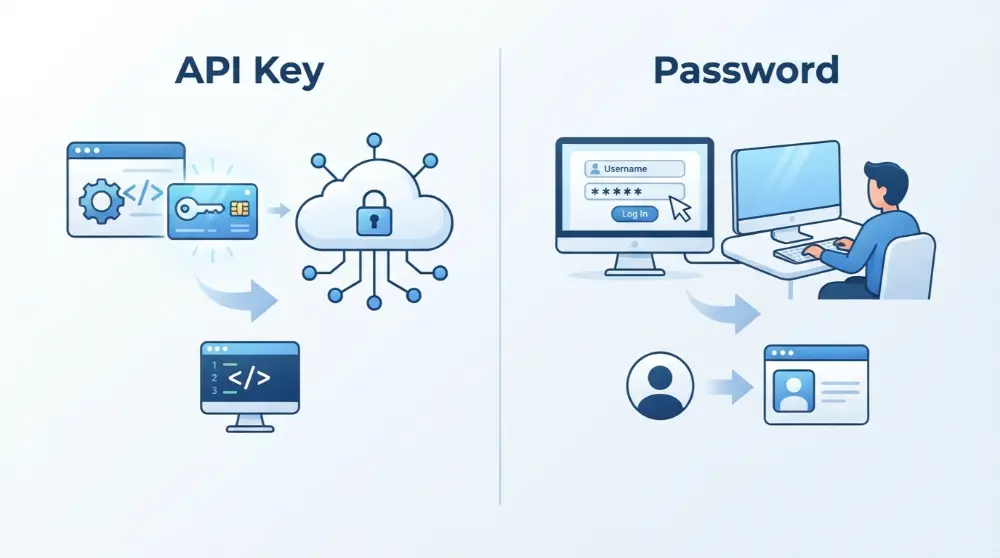
Here’s a simple comparison:
| Feature | API Key | Password |
|---|---|---|
| Main purpose | Identifies an application or project | Helps a person access an account |
| Created by | Usually generated by an API provider | Usually created by a user |
| Used by | Software applications | People |
| Main use | API requests | Account login |
| Security | Needs secure storage and restrictions | Needs secure storage and strong protection |
| Example | Google Maps API key | Google account password |
Is an API Key Just a Password?
No, an API key isn’t exactly the same as a password.
Both can be secret, but they serve different purposes. An API key helps identify a project or application, while a password normally proves that a person can access an account.
Also, an API key alone doesn’t always provide strong security. Some APIs need additional methods, such as OAuth or access tokens, to protect sensitive information and user accounts.
What Are the Different Types of API Keys?
Not all API keys work in the same way. Different providers create keys with different permissions and security settings.
Here are some common types you’ll come across.
1. Public API Keys
A public API key is designed for use in places where users may be able to see it, such as certain website or mobile app configurations.
For example, some Google Maps API keys are used in website code to load maps.
However, public doesn’t mean unrestricted. You should still apply restrictions, such as allowed websites, APIs, or application identifiers, whenever the provider supports them.
2. Secret API Keys
A secret API key is a private credential that should only be available to trusted applications or servers.
For example, a payment service may provide a secret key that allows your server to communicate with its API.
If someone steals this key, they may be able to make requests using your account’s permissions.
That’s why you should never share secret API keys publicly.
3. Restricted API Keys
A restricted API key has specific limits set by its owner or provider.
For example, you may restrict a Google Maps API key so it only works on your website or with selected APIs.
These restrictions reduce the risk of someone using your key somewhere else.
4. Read-Only API Keys
Some API services provide keys that can only access or read information.
For example, a reporting application may need permission to view sales data but shouldn’t be allowed to change or delete it.
A read-only key can help limit what the application is allowed to do.
Note: These categories aren’t universal. Some API providers combine different key features or use different names for their credentials.
How to Get an API Key?
Getting an API key is usually simple. Most providers allow you to create one through their developer dashboard.
Although the exact steps depend on the service, the general process is similar.
- Choose an API provider: Find the service you want to connect with your application.
- Create an account: Sign up or log in to the provider’s website.
- Open the developer dashboard: Look for an API, developer, or project settings section.
- Create a project: Some providers require you to create a project before generating a key.
- Generate your API key: Find the option to create or generate a new key.
- Copy and save your key: Store it in a safe place and follow the provider’s security instructions.

For example, Google Cloud allows developers to create API keys through its Google Cloud Console. Other services, such as OpenAI and Stripe, provide their own dashboards for managing API credentials.
One important tip: Never copy a secret API key into a public document, website, or social media post.
How to Use an API Key in Your Application
After getting an API key, the next step is to connect it to your application. The exact method depends on the programming language and API provider you’re using.
Let’s look at a simple example using Python.
Using an API Key in Python
Suppose you want to connect a Python application to a weather API.
First, install the requests library if you don’t already have it:
pip install requestsNext, you can send a request to the weather service using your API key.
import requestsapi_key = "YOUR_API_KEY"url = "https://api.example.com/weather"params = { "city": "Karachi", "api_key": api_key}response = requests.get(url, params=params)if response.status_code == 200: print(response.json())else: print("Request failed:", response.status_code)In this example:
api_keystores your API key.urlcontains the API address.paramscontains the information sent with the request.requests.get()sends the request to the API.response.json()reads the returned data.
This is a basic example. You’ll need to replace the example URL and request format with the details provided by your actual API service.
How to Use an API Key in JavaScript
You can also use API keys in JavaScript to connect an application to an external service.
Here’s a simple example:
const apiKey = "YOUR_API_KEY";

fetch("https://api.example.com/data", {
  headers: {
    "X-API-Key": apiKey
  }
})
  .then(response => response.json())
  .then(data => console.log(data))
  .catch(error => console.error(error));
This code sends a request to an API and includes the key in the request header.
Important security note: Don’t put a secret API key directly into JavaScript that runs in a visitor’s browser. Anyone can inspect the code and copy the key. Keep secret keys on your server and let your website communicate with your server instead.
How to Keep Your API Key Safe
An API key may look like a small piece of text, but it can give access to valuable services.
If someone steals it, they may use your account’s API quota, create unexpected charges, or access information allowed by that key.
For this reason, protecting your API key is very important.
Here are some simple ways to keep it safe.
1. Never Share Your Secret API Key
Don’t post your secret key on social media, public websites, or online forums.
Also, avoid sharing it through screenshots, emails, or public documents.
If someone needs access to your project, use the provider’s approved access-sharing system instead of sending your personal credentials.
2. Don’t Store API Keys in Public Code
One common mistake is adding an API key directly to source code and uploading it to GitHub.
If your repository is public, anyone may be able to find and copy the key.
Instead, keep secret keys outside your public code files.
3. Use Environment Variables
Environment variables let you store secret information separately from your application code.
For example, in Python, you can read an API key like this:
import osapi_key = os.getenv("API_KEY")You can then set the API_KEY variable in your server environment.
This makes it easier to manage your keys without writing them directly into your source code.
4. Set API Key Restrictions
Many providers allow you to limit where and how an API key can be used.
For example, you may restrict a key to:
- Specific website domains.
- Selected IP addresses.
- Particular APIs.
- Certain applications or platforms.
These limits can reduce the damage if someone gets access to your key.
5. Rotate Your API Keys
Rotating an API key means replacing an old key with a new one.
You should replace a key if you think it’s been exposed, if a team member no longer needs access, or as part of your security policy.
Don’t wait for a problem before taking action.
When rotating keys, make sure your application is updated to use the new key before disabling the old one, where possible.
6. Monitor Your API Usage
Check your API dashboard regularly.
Look for unusual activity, unexpected usage increases, or requests you don’t recognize.
If something looks wrong, disable or replace the affected key and review your account activity.

Common API Key Problems and How to Fix Them
Sometimes, your API key may not work even when you’ve copied it correctly. Don’t worry. Most API key problems have simple causes.
Here are some common errors and ways to fix them.
1. Invalid API Key
This error means the API provider can’t recognize the key you’re sending.
Possible reasons:
- You copied the key incorrectly.
- The key contains extra spaces.
- The key was deleted or disabled.
- You’re using a key from the wrong project.
How to fix it: Check the key carefully and make sure you’re using the correct one. If it still doesn’t work, generate a new key through your provider’s dashboard.
2. API Key Expired
Some API credentials have an expiration date or can be disabled by the provider.
If your key is no longer active, the API may reject your request.
How to fix it: Check your API dashboard to see whether the key is active. If necessary, create a replacement key and update your application.
3. API Key Permission Error
You may have a valid API key but still receive an error because it doesn’t have permission to access a particular service.
For example, your key may allow access to one API but not another.
How to fix it: Open your provider’s dashboard and check the permissions and restrictions attached to your key.
4. API Rate Limit Reached
A rate limit controls how many requests an application can send within a certain period.
For example, your provider may allow 100 requests per minute. If your application sends more than that, it may receive a rate-limit error.
How to fix it: Check your usage limits, reduce unnecessary requests, and follow the provider’s instructions for retrying requests. Some APIs also provide higher limits through paid plans.
5. Billing or Account Problems
Some APIs stop processing requests when an account has an unpaid balance, no available credits, or billing restrictions.
How to fix it: Check your account’s billing section and make sure your payment method and API plan are active.
What Happens If Someone Steals Your API Key?
If someone gets your secret API key, they may use it without your permission.
The damage depends on the permissions attached to the key and the security rules set by the provider.
For example, someone with access to a stolen key might:
- Use your API request allowance.
- Increase your API bills.
- Access data that the key is allowed to read.
- Send unwanted requests through your account.
- Disrupt your application’s normal activity.
If you think your key has been stolen, take these steps:
- Disable or revoke the affected key.
- Generate a new key.
- Update your application with the replacement.
- Check your API usage and billing history.
- Review your security settings and access permissions.
Don’t forget to check your public code repositories for accidentally exposed keys.
Frequently Asked Questions About API Keys
What is an API key in simple words?
An API key is a unique code that helps an application identify itself when connecting to another service. It can also help the provider track usage and control access.
Can I get an API key for free?
Yes. Many API providers offer free API keys or free usage plans. However, some services have request limits, usage restrictions, or paid features.
Always check the provider’s pricing page before using an API.
Is an API key safe to share?
It depends on the type of key. Some keys are designed to be public but still need proper restrictions. Secret API keys should never be shared publicly because someone else may use them to access services through your account.
What can someone do with your API key?
Someone with your API key may be able to send requests using your project’s permissions. Depending on the service, this could lead to unwanted usage, extra charges, or unauthorized access to certain data.
Do I need an API key to use an API?
Not always. Some APIs are public and allow requests without a key. Others require API keys, access tokens, or another authentication method before accepting requests.
What is the difference between an API key and an API token?
An API key is generally used to identify an application or project. An API token may carry information about permissions, users, or access rights.
However, providers sometimes use these terms differently. Always check the security documentation for the API you’re using.
Where can I find my API key?
You can usually find or generate your API key in the provider’s developer dashboard or API settings. The exact location depends on the service.
For security reasons, some providers show a secret key only once when it’s created.
Can I use one API key for multiple applications?
Some providers allow one key to be used across multiple applications, but this isn’t always a good idea.
Using separate keys for different projects makes it easier to track usage, manage permissions, and disable a compromised key without affecting every application.
Conclusion
An API key is an important part of how applications connect to external services. It helps identify projects, track API usage, manage request limits, and control access based on the provider’s rules.
Whether you’re building a website, creating an AI tool, or connecting two applications, understanding API keys can make your work much easier.
Just remember one thing: keep your secret API keys private. Use environment variables, set proper restrictions, monitor usage, and replace any key that may have been exposed.
These simple steps can help protect your application and prevent unwanted API usage.